Cordless Screwdriver vs Drill: Is It the Same Tool?
Explore the differences between cordless screwdrivers and drills, when to use each, torque and speed considerations, chuck types, and common myths. A practical guide for DIYers evaluating tool needs.


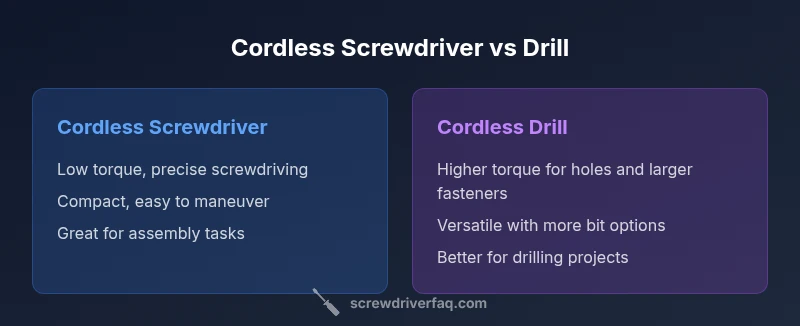
Is a cordless screwdriver the same as a drill? Not exactly. Cordless screwdrivers excel at fast, precise screw driving with low torque and compact design, while cordless drills offer higher torque and versatile hole-making capabilities. For most DIY tasks you’ll choose based on the primary job: screw-driving or drilling, or use a drill with screwdriver bits for mixed jobs. The right choice improves efficiency, reduces user fatigue, and keeps fasteners secure.
Understanding the Core Difference
Understanding whether a cordless screwdriver is the same as a drill starts with the job at hand. The two tools are built around different primary tasks: screwdriving versus hole-making. A cordless screwdriver ports its design into precision, control, and flexibility for driving screws into wood, plastic, or metal with gentle torque. A cordless drill emphasizes raw power, speed, and the ability to bore holes or drive larger fasteners. For the DIYer aiming to assemble furniture or rehang cabinetry, the distinction is practical, not academic. The Screwdriver FAQ team emphasizes that most projects benefit from recognizing the intended use, so you don’t over-commit to a single tool for all tasks. The key takeaway is that the distinction matters for efficiency, control, and the finish you want on each project.
Torque, Speed, and Task Fit
Torque and speed define what you can do with each tool. A cordless screwdriver typically operates at lower torque with steadier, gradual screw driving to prevent cam-out and strip. A cordless drill delivers higher torque and faster rotation, enabling pilot holes, doweling, and large screw-driving jobs. When choosing, think about the slow ramp of torque versus the rapid bite of drilling. For many homeowners, a drill with a screwdriver bit set is a practical compromise, offering the ability to toggle between tasks without swapping tools. Always check the clutch or torque settings, which help tailor performance to the job without damaging materials.
Chuck Sizes, Bits, and Compatibility
Chuck size and bit compatibility drive what fits in your tool bag. Cordless screwdrivers often use a compact hex shank system or a small quick-change chuck designed for comfort and easy bit changes. Cordless drills use larger chucks that accept a broader range of bits, including drill bits for metal, wood, and masonry, plus screwdriver bits. This difference matters for precision work in tight spaces and for continuing holes where bit length and grip affect control. If you occasionally switch between screwing and drilling, a tool with a versatile chuck and a broad bit selection is advantageous.
Use Cases for Screwdriving
Screwdriving tasks form the core of many home projects. You’ll reach for a cordless screwdriver when assembling flat-pack furniture, installing cabinetry, or fastening trim where control and precision matter. Look for features such as a smooth variable speed, a well-balanced grip, and a reliable clutch to prevent overdriving and cam-out. Lightweight design reduces fatigue during long screwing sessions, and a magnetic bit holder helps keep bits secure as you work.
Use Cases for Drilling and Hole-Making
Drilling brings flexibility for holes in wood, plastic, metal, or composite materials. The cordless drill shines where you need higher torque and a broader range of bit sizes. Pilot holes, doweling, and masonry projects benefit from the drill’s power and the ability to switch between drilling and driving tasks with ease. Keep in mind that drilling produces more resistance and faster bit wear; proper bit selection and slow, steady feed help maximize control and accuracy.
How to Read a Tool’s Specification
Specification literacy helps you compare tools without guessing. Focus on the intended task, the torque range, RPM, chuck size, and clutch features rather than chasing the highest numbers. A clear torque range and a clutch system indicate better control for screwdriving, while a larger chuck and higher RPM better support drilling. Remember that battery voltage often correlates with motor power, but real-world performance depends on design, gearing, and weight distribution.
Ergonomics and Everyday Handling
Ergonomics play a critical role in long sessions. A lighter tool with a comfortable grip reduces hand strain during screwing, while a balanced drill should feel natural when switching between drilling and driving. In tight spaces, the smaller form factor of a cordless screwdriver can offer improvements in reach and control. A tool’s vibration, trigger response, and battery feel all contribute to how easily you complete a task without fatigue.
Common Myths Debunked
Myth: A cordless screwdriver can replace a drill for all jobs. Reality: Screwdrivers excel at driving screws; drills handle holes and heavier fasteners. Myth: Any cordless tool can perform equally well in any task. Reality: Bit type, chuck size, torque, and gearing limit what each tool can do. Myth: Higher price guarantees better performance. Reality: Design efficiency, battery chemistry, and ergonomics matter more for real-world results.
How to Choose One Tool for a Small Project
For a small project, identify your primary task first. If the project is screw-dense with lightweight materials, a cordless screwdriver is ideal. If you anticipate drilling holes or driving larger fasteners, prioritize a cordless drill with quality bits and a comfortable grip. For many DIYers, a drill/driver combo or a single drill with screwdriver bits is the best all-around choice. Consider budget, storage space, and the availability of compatible bits and accessories.
How to Use Each Tool Safely
Safety comes first. Wear eye protection, secure your workpiece, and start with low torque before increasing speed. For drilling, secure the drill bit properly and apply steady pressure without forcing the bit. For screwing, avoid over-tightening by using the clutch, which protects fasteners and material. Regularly inspect batteries and chargers, replace worn bits, and store tools in a dry, organized space so you won’t misplace essential bits.
Maintenance and Longevity Tips
Battery health drives tool longevity. Keep batteries between use and store in a cool, dry place. Charge fully before long storage to prevent degraded cells. Clean grip surfaces and bit holders to maintain reliable engagement. Periodically swap worn-out bits, inspect chucks for play, and lubricate moving parts per the manufacturer’s guidance to sustain performance.
Cost Considerations and Value
Cost often reflects versatility. Cordless screwdrivers typically cost less upfront but offer limited drilling capability, while cordless drills may come at a higher price yet provide broader utility. When budgeting, weigh the value of having a dedicated driver for assembly tasks against purchasing a drill with a broad bit set for holes and light driving. Look for bundles that include essential bits and chargers to maximize value.
Real-World Scenarios and Recommendations
Imagine you’re assembling a DIY bookshelf. A cordless screwdriver with an adjustable clutch helps prevent overdriving and damage to panels. If you’re mounting hardware or drilling pilot holes for screws, a cordless drill with correct bits ensures clean holes and secure fasteners. In many cases, investing in a drill/driver setup with interchangeable bits provides flexibility for future projects. Build your toolkit around the tasks you perform most frequently and adapt as needs evolve.
Comparison
| Feature | Cordless screwdriver | Cordless drill |
|---|---|---|
| Power/torque emphasis | Low-to-moderate torque for precise driving | Moderate-to-high torque for drilling and driving larger fasteners |
| Chuck size and bit range | Compact chuck or hex shank; limited bit types | Larger chuck; wide range of drill bits and driver bits |
| Best use case | Precise screwdriving, assembly, and light-duty fastening | Hole-making, doweling, and versatile fasteners |
| Weight and ergonomics | Typically lighter; highly maneuverable | Usually heavier but balanced for drilling tasks |
| Battery needs | Often optimized for sustained screw driving | Designed for higher power for drilling and longer sessions |
| Accessory ecosystem | Screwdriver bits, magnetic holders | Drill bits, screwdriving bits, augers, and more |
| Cost and value | Typically lower upfront cost | Often higher upfront cost with broader capability |
| Safety considerations | Lower risk of over-tightening with clutch | Higher risk of overdriving if clutch not used correctly |
Pros
- Quicker setup for screws in assembly tasks
- Lighter and easier to maneuver in tight spaces
- Typically lower upfront cost and simpler maintenance
- Smaller size fits between furniture parts and shelves
Negatives
- Limited drilling capability and hole sizing
- Longer projects may require more batteries or charging time
- Fewer high-torque options for demanding tasks
- Bit availability may be narrower than a full drill ecosystem
Cordless drills win for versatility; cordless screwdrivers excel at precise screwdriving
Choose a cordless drill when you need holes, larger fasteners, and broader bit compatibility. Choose a cordless screwdriver for quick, precise screw driving and assembly work. For many DIYers, a drill with screwdriver bits covers both worlds, offering flexibility as projects evolve.
Quick Answers
Is a cordless screwdriver the same as a drill?
No. A cordless screwdriver is optimized for driving screws with controlled torque and a compact form, while a drill is designed for drilling holes and handling higher-torque tasks. Many DIYers benefit from using a drill with screwdriver bits for mixed tasks.
No—screwdrivers drive screws, drills bore holes and handle tougher fasteners. They have different strengths, so choose based on the job.
Can I use a cordless screwdriver to drill holes?
A cordless screwdriver is not ideal for most drilling tasks due to lower torque and a smaller chuck. If you absolutely must, use a drill bit in a compatible chuck? However, expect slower progress and potential damage to the bit or material.
You can but it’s not recommended for regular drilling; use the right tool for the job.
What should I look for in chuck size and bit compatibility?
Check whether the tool uses a hex shank or a traditional chuck. A hex shank is quick and versatile for screwdriver bits, while a larger chuck accepts a wider range of drill bits. The right combination improves ease of use and task scope.
Look for a chuck that fits your most-used bits and keeps changes fast.
Do cordless screwdrivers have reversible bits and multiple speed settings?
Many cordless screwdrivers offer reversible operation and a few speed/torque settings to help prevent overtightening and achieve cleaner starts. Use lower settings for delicate materials and higher settings for tougher screws.
Yes, most have reverse and some speed clues—adjust as needed.
Should I buy a drill-first or screwdriver-first?
If you expect many screwdriving tasks, a cordless screwdriver can be enough. If you anticipate holes or larger fasteners, prioritize a drill (or a drill/driver) and add screwdriver bits later.
Think about your project mix—drill first for flexibility, then add a screwdriver if needed.
Are there combo tools that function as both?
Yes, many drills include drill/driver modes with interchangeable bits. A dedicated cordless screwdriver is still useful for everyday assembly tasks. Assess the value and weight of a multi-tool versus two dedicated tools.
There are drill/drivers that handle both tasks, but dedicated tools can be better for comfort and control.
The Essentials
- Assess primary tasks first to pick the right tool
- Prefer screwdrivers for precision and speed in assemblies
- Opt for a drill when hole-making and heavy fastening are frequent
- Look for a balanced weight, adjustable torque, and good bit availability
- Consider a drill/driver combo for maximum versatility