Is a Power Screwdriver the Same as a Drill? A Practical Guide for DIYers
Explore the differences between power screwdrivers and drills, when to use each, and how to pick the right tool for DIY projects. Expert guidance from Screwdriver FAQ.


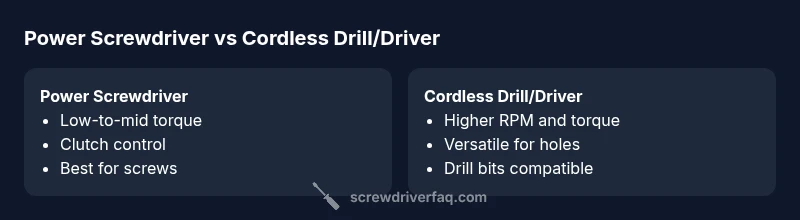
Is a power screwdriver the same as a drill? Not exactly. A power screwdriver is optimized for driving screws, with clutch control and slower speeds, while a drill is built for drilling holes with higher rotation and broader bit versatility. In many shops, a drill/driver combo covers both tasks. According to Screwdriver FAQ, understanding these roles helps DIYers pick the right tool for a given project.
The Core Difference: Screwdrivers vs Drills
In the world of power tools, the most fundamental distinction is purpose. A power screwdriver is designed to insert fasteners with control and precision, while a drill is designed to remove material by creating holes. The question “is a power screwdriver the same as a drill?” often comes up for DIY enthusiasts, and the short answer is no—though some tools blend features. According to Screwdriver FAQ, the practical takeaway is to match your tool to the job: fastened joints require a driver, while holes require a drill. This distinction becomes more nuanced when you encounter drill/driver combos, which attempt to blend capabilities without sacrificing too much efficiency in either task.
When a Power Screwdriver Shines: Ideal Projects
Power screwdrivers excel in repetitive screwing tasks where speed and consistency matter. Assemblies for furniture, cabinetry, and built-in fixtures benefit from calibrated torque and a clutch that prevents overdriving or stripping screws. For homeowners tackling hanging shelves or assembling flat-pack furniture, a power screwdriver reduces fatigue and improves repeatable results. The Screwdriver FAQ team notes that for fasteners placed at precise depths, a driver’s torque regulation is the differentiating factor that keeps projects looking neat and professional.
Key Specifications to Compare
When evaluating a power tool, focus on three core specs: torque range, speed, and battery life. A typical power screwdriver prioritizes a lower RPM range and a clutch to control driving depth, making it ideal for screw driving but less versatile for drilling. A drill emphasizes higher RPM and greater torque, with a larger chuck to accommodate various drill bits and hole sizes. In practice, most DIYers will compare available torque settings, chuck compatibility (hex vs. keyless), and battery capacity to estimate run time. Screwdriver FAQ recommends listing your common tasks first, then picking a tool that balances speed with control.
Chuck, Bit Systems, and Ergonomics
A solid chuck design is more than a gimmick; it affects how quickly you can switch bits and maintain accuracy. A power screwdriver typically uses a quick-release or hex-shank system tailored for Phillips and flathead bits, while a drill may offer a larger, versatile chuck. Ergonomics matter too: a lighter tool with a balanced grip reduces fatigue during hours of screwing, especially in overhead or tight-space work. The difference in weight distribution can influence steering and depth control, making an ergonomic handle a practical consideration for long projects.
Variants and Hybrid Tools: Drill/Drivers, Impact Drivers
Hybrid tools—often marketed as drill/drivers or impact drivers—aim to cover multiple tasks with a single tool. While convenient, these hybrids may compromise on depth control for screwing or the drilling power needed for dense material. For most home projects, a dedicated power screwdriver plus a separate cordless drill remains the simplest, most controllable setup. The Screwdriver FAQ team emphasizes weighing the need for speed and depth control against the flexibility of a single, multi-task tool.
Common Misconceptions About Power Tools
A frequent misunderstanding is that any cordless tool can perfectly substitute for a dedicated driver or drill. In reality, attempting heavy drilling with a screwdriver can strip fasteners or damage bits, while using a drill for precise screw driving may lead to overdriving or cam-out. Another myth is that higher RPM automatically improves results; in screwing, optimal torque control matters more than raw speed. By clarifying these roles, DIYers avoid underperforming tools and expensive mistakes.
How to Choose for DIY Projects: A Step-by-Step Framework
Start with a quick task audit: how many screws will you drive, and what materials will you encounter? If your main job is building items or hanging fixtures, prioritize a driver with a good clutch and comfortable grip. If you’ll create holes or drill into tougher materials, choose a drill/driver setup or a dedicated drill with appropriate bits. Budget considerations matter, too: a compact cordless screwdriver with a modest battery is sufficient for light tasks; for larger projects, invest in a tool with better battery life and a reliable charger. The Screwdriver FAQ Team suggests comparing two or three models side by side to see which feels best in your hand.
Practical Scenarios: Quick Decision Guide
Scenario 1: You’re installing cabinets and fastening dozens of screws. A dedicated power screwdriver with a clutch is your best bet. Scenario 2: You need to drill pilot holes before inserting screws. A drill or a drill/driver with a mid-range bit set saves time and reduces bit wear. Scenario 3: You’re working in a tight space where a compact driver can reach more joints than a bulky drill. In this case, a compact drill/driver combo may be ideal. The key is aligning tool capabilities with the most common tasks you perform.
Safety, Maintenance, and Longevity
Safety comes first: always wear eye protection and keep hands away from rotating bits. Regular maintenance—bit inspection, battery care, and quick-release chuck checks—extends tool life. Store tools in a dry, organized space to prevent corrosion and accidental damage. The Screwdriver FAQ Team recommends periodic lubrication of moving parts and avoiding prolonged continuous use that overheats the motor. Proper care reduces performance drop-offs and preserves torque accuracy.
Comparison
| Feature | Power Screwdriver | Cordless Drill/Driver |
|---|---|---|
| Rotational speed (RPM) | Low-to-mid (screw-focused) | Mid-to-high (hole-focused) |
| Torque emphasis | Low torque for controlled driving | Higher torque for drilling and driving |
| Chuck/Bit system | Hex or quick-release for bits | Keyless chuck for drill bits |
| Versatility | Specialized for screwing tasks | Broader range of drilling and driving |
| Weight and ergonomics | Lightweight, compact control | Slightly heavier with larger grip |
| Battery capacity | Smaller battery optimized for screwing | Larger battery for extended drilling |
| Best use case | Frequent screwing, cabinetry, furniture assembly | Hole prep and mixed fastener tasks |
| Price range | Lower upfront cost for basic models | Moderate to higher cost for multi-task tools |
Pros
- Fast, consistent screw driving reduces fatigue
- Clutch control minimizes stripping and cam-out
- Compact design improves precision in tight spaces
- Lower cost for basic screwdriving tasks
- Simple maintenance and fewer parts to wear
Negatives
- Limited drilling capabilities with most models
- Not ideal for large or deep holes
- Battery life can be shorter under heavy drilling
- Hybrid drill/drivers may compromise depth control
Cordless drill/drivers offer broader utility; dedicated power screwdrivers excel at quick, precise screw driving
If your projects involve mostly fastening, a power screwdriver with a clutch is ideal. For mixed tasks including drilling, a drill/driver combo provides versatility and efficiency.
Quick Answers
Is a power screwdriver the same as a drill?
No. A power screwdriver is optimized for driving screws with torque control, while a drill is built for making holes with higher speed and bit versatility. Drill/driver hybrids try to cover both tasks but may sacrifice some precision for speed.
No, they serve different primary tasks: screws versus holes. A drill/driver can do both, but dedicated tools perform each job best.
Can a cordless drill act as a screwdriver?
Yes, many cordless drills can drive screws when equipped with appropriate bits and set to a lower torque. For repeated screwing, use a driver with a clutch to avoid overdriving fasteners.
A cordless drill can drive screws, but for many sessions a calibrated driver with a clutch is better.
What is the main difference between a drill and a driver?
The main difference is purpose: drills create holes, drivers insert screws with torque control. A drill/driver blends both functions, but a dedicated driver prioritizes screw driving accuracy.
Drill makes holes; driver drives screws with torque control. A drill/driver blends both but may compromise precision.
When should I choose a drill/driver combo?
Choose a combo when you frequently switch between drilling and driving tasks in DIY projects. It saves space and money, but ensure the device offers reliable torque control for screwing.
Pick a drill/driver if you often bore holes and drive screws in one project.
Are there safety concerns with driving screws with a drill?
Yes. Always use eye protection, verify bit compatibility, and set the correct torque. Avoid overdriving and cam-out which can strip threads or damage the workpiece.
Be careful with torque and bit fit to prevent stripping.
What maintenance helps extend tool life?
Regularly inspect bits, keep chucks clean, charge batteries properly, and store tools in a dry place. Periodic lubrication of moving parts can also improve longevity.
Inspect, clean, and charge smartly to keep tools lasting longer.
The Essentials
- Identify primary tasks before tool shopping
- Torque control and clutch are critical for screws
- Drills excel at holes; drivers excel at fasteners
- Hybrid tools trade some precision for versatility
- Power tool maintenance extends life and performance