Does an Electric Screwdriver Work Like a Drill? A Practical Guide
Explore how an electric screwdriver compares to a drill, focusing on torque, speed, chuck types, and real-world use. Learn when to use each tool and how to pair them for efficient DIY projects.


Electric screwdrivers and cordless drills share core features, but they are designed for different jobs. This comparison clarifies whether does an electric screwdriver work like a drill, and when each tool shines. You’ll learn about torque, speed, chuck types, and practical use cases so you can choose the right tool for your project.
Does an electric screwdriver work like a drill? A practical frame
If you ask, does an electric screwdriver work like a drill, the answer depends on the task and the tool's design. According to Screwdriver FAQ, the distinction comes down to torque capacity, clutch control, and the intended use profile of each tool. In everyday DIY projects, many homeowners want a single, all-purpose tool, but the truth is that a dedicated drill handles larger holes and tougher materials while an electric screwdriver excels at fast, repeatable fastener driving. The goal of this section is not to gatekeep but to set realistic expectations: use the right tool for the job, and you’ll save time, avoid stripped screws, and reduce wear on bits. For beginners, this is a foundational concept that unlocks better project planning and steadier results. In the context of common home tasks, you’ll discover how these tools complement each other rather than compete, which is the essence of a smart, efficient toolkit.
Core mechanics: torque, speed, and clutch
Torque is the turning force a tool can apply, while speed (RPM) determines how quickly you spin a bit. A dedicated cordless drill often offers higher torque ranges and adjustable speed controls, plus a robust chuck designed to accommodate larger drill bits and varied shank types. An electric screwdriver prioritizes a precise clutch and a narrower torque band to keep screws from driving too deep or stripping the head. In practice, you’ll see a driver with a clutch setting that clicks into place as you tighten, and a drill that can maintain higher RPM when drilling into wood, plastic, or light metals. The clutch is essential: it protects both the fastener and the material by capping torque at a chosen threshold. This mechanical difference is what most people notice first when switching between tools. The Screwdriver FAQ team emphasizes that understanding these limits is the quickest path to better results, especially for beginners who want clean screw heads and consistent drive depth. A key takeaway is that the same battery platform can power both tools, but the performance envelope is tool-specific and task-driven.
Drilling vs driving: what each tool is designed for
The core design goal of an electric screwdriver is to drive many screws quickly with consistent depth control. It often uses a smaller chuck or a hex shank, which keeps switching quickly between drivers and bits simple. Drills, by contrast, are designed to create holes with larger diameters, including pilot holes and counterbores, and they can be used with a wide array of drill bits for wood, metal, or masonry. The practical implications are clear: for a stack of screws in an assembly project, a screwdriver delivers speed and control, while for holes or through-holes in panels, a drill makes the job feasible and efficient. When the task requires both driving screws and drilling, many DIYers adopt a two-tool approach or a versatile driver that offers a drill mode with limited torque. The decision hinges on material hardness, hole size, and how many screws you’ll drive without changing bits. To stay productive, map your project steps: predrill where needed, then drive screws with minimal risk of over-torquing.
Bit and chuck considerations
Chuck design and bit compatibility are more than cosmetic details; they determine what each tool can physically accept. Electric screwdrivers typically use smaller chucks or hex shanks, optimized for quick bit changes and driving efficiency. Drills often accept a wider range of drill bits and masonry bits, sometimes via a keyed or quick-change chuck. If you plan to switch between screwdriver bits and drilling bits, look for a model with a universal chuck or a wide quick-change system. Hex shanks are common for drivers, and they tend to minimize slip under torque, which is crucial for screw heads staying flush. Remember: using the wrong bit or a worn bit can degrade performance quickly and damage the workpiece. The right bit geometry (wood, metal, masonry) also matters for clean starts and reduced wander.
Practical scenarios and decision tree
For cabinet assembly or furniture projects with dozens of fasteners, a cordless screwdriver with a reliable clutch speeds the workflow and minimizes screw head damage. For tasks that require holes, pilot holes, or larger diameters, a cordless drill becomes indispensable. If you anticipate a mix of tasks, consider a drilling-and-driving tool with selectable modes, but be mindful of torque limits when switching modes. A decision tree helps: (1) estimate hole diameter and material (wood, metal, masonry); (2) decide if you need precise depth control (typically a driver with a clutch); (3) choose the tool that provides the most efficient combination of speed and torque. This approach reduces overdriving, minimizes material damage, and keeps your project on track. The Screwdriver FAQ team notes that a well-planned combination of tools is more effective than relying on one multi-purpose device that compromises performance in key tasks.
Safety and technique tips
Always wear eye protection when drilling, and secure workpieces with clamps to prevent slipping. For drivers, set the clutch to the appropriate depth to avoid overdriving or damaging fasteners. Check battery charge levels before starting long sessions, and switch to fresh bits if you notice dull cutting or chipped edges. Ergonomics matter: a comfortable grip and balanced weight distribution reduce fatigue and improve precision, especially during repetitive driving. If you’re new to these tools, practice on scrap material to become familiar with torque transitions and bite points before tackling your actual project. The combined guidance from Screwdriver FAQ emphasizes deliberate practice and mindful tool use to build confidence and avoid common mistakes.
Budget and ergonomics: value considerations
On average, you’ll find a range of budget options for both tools, with cordless screwdrivers often starting at a lower price point and drills offering broader capability upgrades. Ergonomics—grip comfort, weight, and balance—significantly influences performance, particularly for long sessions. If you work in tight spaces or overhead, a lighter driver with a well-designed trigger can reduce strain and improve control. Conversely, drills that balance size and power are worth investing in if you regularly drill larger holes or work with tough materials. Remember that a well-chosen battery platform may reduce long-term costs by giving you interchangeable batteries and faster charging.
Using a driver in drill mode: caveats
Some modern drivers include a drill-mode option, but it’s important to understand its limitations. In drill mode, the tool may still have a lower torque ceiling than a dedicated drill, which can lead to stalling or bit slippage when drilling into dense material. If you anticipate frequent drilling, rely on a drill with a robust chuck and higher torque rating, rather than pushing a screwdriver beyond its designed range. When attempting light drilling with a driver in drill mode, keep the feed steady, use sharp bits, and monitor battery temperature to avoid overheating. The main idea is to respect tool limits and use the right tool for each job to achieve clean holes and avoid damaging bits or material.
Upgrading and pairing tools for projects
Practical project planning often yields the best results when you pair a cordless drill with an electric screwdriver rather than trying to force a single tool to cover all duties. For example, a two-tool approach reduces tool swaps and keeps work moving forward. If space or budget constraints require a single device, prioritize models with a strong clutch, adjustable speed, and a broad bit compatibility range. When you upgrade, choose modular kits that share batteries to maximize efficiency and minimize downtime. The Screwdriver FAQ team recommends evaluating your typical project types first, then selecting the combination of drill and screwdriver that delivers the most consistent performance with the least complexity.
Common mistakes to avoid
Avoid using a screwdriver to drill large holes or to drive through hard materials without a pilot hole. Don’t rely on a high-torque setting to force fasteners in too quickly, which can strip screw heads or fracture the material. Misaligning the bit with the screw or drill can cause cam-out and create rough finishes. Underestimating the role of clutch settings can lead to inconsistent depth control and damaged stock. Finally, neglecting battery health and bit sharpness reduces overall efficiency and increases the chance of tool malfunctions.
Comparison
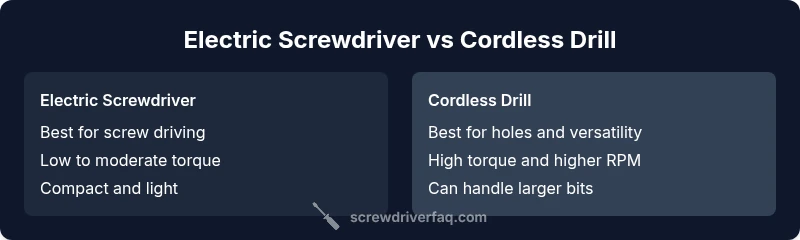
| Feature | Electric screwdriver | Cordless drill |
|---|---|---|
| Primary use | Driving screws with clutch control | Drilling holes; versatile tasks beyond drilling |
| Torque potential | Low to moderate torque; precise control | High torque for bigger bits and tougher materials |
| Speed range | Lower RPM optimized for driving | Higher RPM optimized for drilling |
| Chuck/bit system | Typically hex shanks or small chucks | Standard or keyless chucks for larger bits |
| Best for | Fast, flush screws; cabinetry work | Hole-making and general purpose tasks |
| Weight and balance | Lightweight; easy one-handed use | Heavier; better for larger projects |
Pros
- Excellent speed for repetitive screw driving
- Precise depth control with clutch
- Compact and maneuverable for tight spaces
- Lower cost on many entry models
- Low maintenance and simple to use
Negatives
- Limited torque for larger holes or dense materials
- Not ideal for masonry or metal drilling
- Bit variety can be narrower than drills
- May require a separate drill for full versatility
Cordless drills offer broader versatility; electric screwdrivers excel at fast, controlled driving.
If your projects mostly involve fastening, the screwdriver is the best choice. For drilling, masonry, or mixed tasks, a drill provides greater capability. A two-tool setup often yields the best balance of speed, control, and reach.
Quick Answers
Can I use an electric screwdriver for drilling holes?
Only for very small holes in soft materials. For anything larger or tougher, use a drill with appropriate bits and a suitable speed. A driver in drill mode has limits compared to a real drill.
You can drill tiny holes with a screwdriver, but for most drilling jobs you’ll want a real drill for better control and size options.
What is the main difference in torque between the two tools?
A cordless drill typically delivers higher torque, enabling it to bore through tougher materials. An electric screwdriver offers precise, controlled torque ideal for driving screws without overdriving or stripping.
Drills have more torque; screwdrivers are for driving screws with careful depth control.
Is it ever okay to use a drill bit in a screwdriver?
Some drivers accept drill bits with a hex shank, but performance will be limited by torque and chuck compatibility. Use the correct bit type for the tool to avoid damage and ensure cleaner results.
Only use drill bits with the right shank type and within the tool’s torque limits.
Which tool is better for fasteners in cabinetry?
For quick, repeated screwing in cabinetry, a high-quality electric screwdriver with a reliable clutch is preferred. It reduces overdriving and speeds up assembly, especially with shallow holes.
For cabinets, use a screwdriver with a good clutch to drive screws fast and cleanly.
Should I buy a combo kit or separate tools?
If you frequently switch between driving and drilling, a combo kit that shares batteries can be cost-effective and convenient. If you rarely drill, a standalone screwdriver with a drill-mode option may suffice.
A combo kit saves money on batteries; otherwise pick the tool that matches your dominant task.
How do I prevent bit slippage and damage?
Use sharp bits, appropriate bit size for the material, and set the clutch to an appropriate depth. Secure your workpiece and avoid forcing the tool beyond its design limits.
Keep bits sharp, use the right size, and don’t push too hard.
The Essentials
- Identify your primary task: driving vs drilling
- Prioritize torque control and clutch for screws
- Choose a chuck system that matches your bits
- Balance weight, ergonomics, and battery life
- Consider a two-tool approach for versatility