Why Does My Screwdriver Keep Slipping? A Practical Troubleshooting Guide
Struggling with a slipping screwdriver? This urgent guide covers common causes, quick fixes, and a step-by-step approach to restore grip and finish your DIY project safely.


Screwdriver slips are usually caused by wear on the tip or using the wrong bit size for the screw head. According to Screwdriver FAQ, start by inspecting the bit, replacing worn tips, and ensuring you’re using the correct bit type and size. Apply steady pressure straight down and test on a fresh screw before continuing.
Why a screwdriver slips: the physics of cam-out and wear
Screwing tasks rely on a precise grip between bit and screw head. When that grip fails, the driver can slip out of the screw and twist without turning the screw deeper. According to Screwdriver FAQ, the most common culprits are worn or damaged tips, using the wrong bit size or profile for the screw, and a dirty or corroded screw head. Cam-out occurs when the bit loses contact with the screw and the driver slips instead of turning the screw. Over time, repeated use wears down the tip and the screw head, making future attempts to drive or remove a screw more difficult. The result is a frustrating cycle: more slipping, more rounding, and more time spent on a single fastener. Understanding the root causes helps you pick the right remedy, from a simple bit replacement to a full tool upgrade.
Tip: Regular maintenance—clean storage, dry hands, and proper bit care—reduces future slip incidents and lengthens tool life.
Common culprits in everyday use
The majority of slipping incidents fall into a handful of practical causes:
- Worn or damaged bit: a dulled edge can’t bite into the screw head, so the driver tends to skip out.
- Mismatched bit size or profile: using a Phillips bit on a flat-head screw, or a too-large/too-small bit, increases cam-out and strips the head faster.
- Dirty, rusted, or damaged screw head: debris or corrosion reduces the surfaces that grip the bit.
- Slippery hands or a slick handle: oil, water, or silicone can reduce friction, making it easy to lose grip.
- Loose handle or shaft: any wobble between the bit and the handle wastes torque and invites slippage.
As noted by Screwdriver FAQ analysis, correcting these factors eliminates most slipping events in home projects.
Quick checks you can perform before you pull out tools
Starting with the simplest fixes saves time. Do these checks in order:
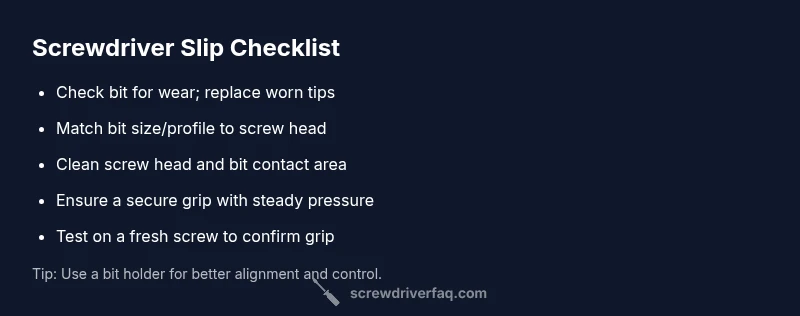
- Inspect the bit for wear: look for rounded edges or a shiny, smooth contact surface. If worn, replace the bit.
- Confirm screw-head compatibility: verify you’re using the correct type and size of bit for the screw at hand.
- Clean the screw head and bit contact area: remove any dirt, paint, or rust that interferes with grip.
- Test grip and contact: hold the bit firmly in the screw head and apply steady pressure straight down.
- Check the tool’s grip: ensure the handle is snug and not wobbly, and that the bit is seated fully in the chuck or driver.
- Re-test on a fresh screw: if it still slips, move to a higher-quality bit or consider upgrading the driver.
If this doesn’t fix the problem, try a different bit or a bit holder, and avoid forcing the screw. For stubborn cases, stop and reassess the screw’s head condition; continuing to drive with a degraded bit can worsen damage.
A deeper look at edge cases and when to upgrade
Not every slipping issue can be solved with minor adjustments. When the bit shows visible wear after a few projects, or if the bit repeatedly rotates without turning the screw, replace it. If the screwdriver handle is loose, the shaft wobbly, or the chuck won’t hold bits securely, a full tool upgrade may be the best investment. For aggressive fastening or frequent use, choose a set with hardened tips, magnetic bits, and a robust handle that fits your hand. A high-quality screwdriver maintains grip longer, reduces fatigue, and minimizes slipped screws on longer DIY projects. Remember: consistent maintenance—cleaning, proper storage, and dry hands—prevents future slip incidents.
Steps
Estimated time: 15-25 minutes
- 1
Assess the bit for wear
Hold the bit up to a light and inspect the edge for rounding or chips. If you see wear, replace the bit with a fresh one that matches the screw head.
Tip: Compare against a new bit to confirm wear; if in doubt, replace. - 2
Verify screw-head compatibility
Identify the screw type and size, then select the exact bit profile that fits snugly. Mismatched bits are a frequent cause of cam-out.
Tip: When in doubt, try a slightly smaller bit that still seats firmly. - 3
Clean contact surfaces
Wipe the screw head and the bit edge to remove dust, paint, or rust. Debris can prevent proper grip and cause slipping.
Tip: A quick wipe with isopropyl alcohol helps remove oils and residue. - 4
Secure the grip and seating
Make sure the bit is fully seated in the chuck and the handle is tight. Apply steady, straight downward pressure as you turn.
Tip: Avoid twisting at an angle; keep the screwdriver perpendicular to the work surface. - 5
Test with a fresh screw
Try a new screw to verify the issue is resolved. If slipping persists, move to a higher-quality bit or driver.
Tip: Use a scrap piece of wood to test before continuing on the project. - 6
Upgrade if needed
If wobble or poor grip continues, consider replacing the screwdriver or upgrading to magnetized, hardened-tip bits for better control.
Tip: Choose a tool that fits your hand and feels secure during use. - 7
Document and prevent future slips
Store bits dry and organized; perform periodic maintenance and inspect bits after heavy use to catch wear early.
Tip: Create a quick bit-wear check routine after every project.
Diagnosis: Screwdriver slips repeatedly when driving screws
Possible Causes
- highWorn or damaged driver tip causing poor contact
- mediumUsing the wrong bit size or profile for the screw head
- lowDirty or corroded screw head or bit contact surface
- lowSlippery grip from oil, sweat, or a slick handle
Fixes
- easyInspect the bit for wear and replace with a fresh tip that matches the screw head
- easyDouble-check screw head type and bit size; switch to the correct bit if needed
- easyClean both the screw head and bit contact area before retrying
- easyEnsure the grip is secure; dry hands or use gloves; keep the handle clean
Quick Answers
Why does my screwdriver keep slipping?
Slipping is usually caused by worn tips, using the wrong size, or a dirty screw head. Start by inspecting the bit and screw head, then replace worn parts.
Slipping is usually due to worn tips, wrong size, or a dirty screw head. Check your bit and screw head, then replace worn parts.
How can I tell if a bit is worn?
Look for rounded edges, a shiny contact surface, or frequent cam-out when engaging screws. Compare with a new bit to confirm.
Check for rounded edges or a shiny wear on the tip; compare with a new bit to confirm.
What is cam-out and how can I prevent it?
Cam-out is the driver slipping out of the screw head. Prevent it by using the right bit size and type, keeping steady pressure, and choosing a quality bit.
Cam-out is the bit slipping out of the screw head. Use the right bit and steady pressure to prevent it.
Should I use a power screwdriver if it slips?
Power tools can help, but risk cam-out if used with the wrong bit or high torque. Use low torque and correct bit for best results.
Power tools can help, but you must use the right bit and keep torque in check.
What if the screw is already stripped?
Try a screw extractor or the rubber-band trick. If severely damaged, replace the screw or work with a fastener that’s still in good condition.
If the screw is stripped, use an extractor or rubber band technique; otherwise replace the screw.
When should I replace my screwdriver?
If the handle is loose, the shaft wobbly, or the bit won’t grip, it’s time for a replacement or upgrade.
Replace the screwdriver if the handle is loose, the shaft wobbly, or the bit won’t grip.
Watch Video
The Essentials
- Inspect worn bits and replace to restore grip
- Always use the correct bit size and profile for the screw head
- Clean contact surfaces before driving
- If slipping continues, upgrade to a higher-quality screwdriver