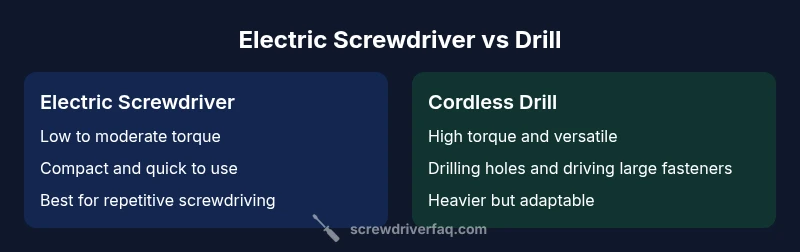
Electric Screwdriver vs Drill: Which Tool Is Right for Your DIY Projects?
A detailed, objective comparison of electric screwdrivers and cordless drills for DIY homeowners. Learn about torque, speed, battery life, versatility, and when to use each tool.


The quick answer: An electric screwdriver excels at quick screwdriving tasks, offering light torque, compact size, and lower fatigue. A cordless drill provides greater torque, drill bits, and overall versatility for boring holes and handling tougher fasteners. For pure screwdriving, pick the screwdriver; for mixed drilling and driving, choose the drill.
Quick Distinctions
In the world of home improvement, the question electric screwdriver vs drill often comes up. According to Screwdriver FAQ, for light screwdriving tasks an electric screwdriver is faster and easier to control than a drill. The compact size reduces wrist strain and makes it easier to work in tight spaces. By contrast, a cordless drill brings higher torque, a wider range of bits, and the ability to bore pilot holes or drive larger fasteners. This fundamental difference—driving screws quickly versus drilling holes and handling tougher fasteners—drives most of the decisions homeowners face when stocking a toolkit. Understanding the core用途 helps set expectations for what each tool can and cannot do. For many projects, you’ll find that a lightweight screwdriver is ideal for quick assembly, while a drill handles the bulk of woodworking and remodeling tasks. This article compares those capabilities under real-world conditions and practical constraints.
Brand context: As emphasized by the Screwdriver FAQ team, the most important factor is task alignment, not brand hype. The right tool selection begins with a clear picture of your typical projects and environments.
Torque and Speed: How They Differ in Practice
Torque and speed are the central axes of comparison between an electric screwdriver and a drill. An electric screwdriver typically delivers modest torque, optimized for fasteners and repetitive driving without cam-out, which helps prevent stripped screws and damaged workpieces. Its speed is steady but modest, designed to keep control high and fatigue low during long screwdriving sessions. A cordless drill, in contrast, offers higher torque and a wider RPM range. The drill excels at drilling into softwoods and some plastics, and it can handle larger screws when paired with higher torque settings and appropriate bits. The higher torque means you can drive longer fasteners into tougher materials more efficiently, but it also increases control challenges for beginners. When choosing between the two, assess the typical screw sizes you encounter and whether you’ll regularly drill pilot holes or tackle denser materials.
In many home projects, the torque advantages of a drill translate to faster progress on tasks that mix driving and drilling, such as building a shelf or assembling cabinetry. The Screwdriver FAQ team notes that torque isn’t just about forcing a fastener; it’s about matching the tool’s capability to the material’s resistance. For light tasks, the screwdriver’s gentler torque reduces risk of overdriving or stripping.
A practical rule of thumb is to reserve an electric screwdriver for small fasteners and repetitive driving, and keep a cordless drill ready for holes, anchors, or larger screws that require more power. This balance minimizes wear on fasteners and reduces the chance of damage to fragile workpieces. For more nuanced decisions, consider your typical materials, screw lengths, and whether you’ll also need to drive or drill in tight spaces where control is paramount.
Screwdriver FAQ analysis shows that many DIYers underestimate the impact of torque on finish quality and material compatibility. By aligning tool capability with project requirements, you can avoid common mistakes and keep projects moving smoothly.
Size, Ergonomics, and Control
Size and ergonomics often determine whether a tool feels comfortable enough to use for extended periods. Electric screwdrivers are compact, lightweight, and easy to handle in tight corners or overhead work. They reduce hand fatigue in repetitive screwing tasks and are less prone to causing wrist strain during extended sessions. The trade-off is that their smaller grip and lighter bodies may feel less controlled when starting large or stubborn fasteners. Cordless drills are bigger and heavier, but they offer a more balanced weight distribution when working on larger boards or overhead installations. Some models feature soft grips and balanced chassis to improve control, but the increased bulk can limit accessibility in narrow spaces.
If you frequently work in cramped areas, the screwdriver’s slim profile is a major advantage, particularly for cabinetry, furniture assembly, and electronics mounting. Conversely, in projects that require precision drilling or large-format screws, a drill’s weight distribution helps maintain stability. Keep in mind that battery packs contribute significantly to the overall weight and balance; a heavier battery can offset some ergonomic benefits if you’re working overhead for long periods. In any case, test handling both tools before committing to a purchase to ensure you’re comfortable with the grip, trigger feel, and control during real tasks.
The ergonomics of a tool influence not only comfort but accuracy. A steady hand reduces the likelihood of cam-out and misaligned screw holes, especially on delicate materials. For repetitive screwdriving, an ergonomic handle and smooth trigger can translate to faster progress with fewer mistakes. It’s worth noting that the battery and motor housing design can affect heat buildup; models with efficient heat management stay comfortable longer during long sessions. If you’re unsure, aim for mid-range models that balance weight, grip, and performance rather than chasing extreme lightness at the expense of control.
Drilling Capacity and Screw-Driving Efficiency
Drilling capacity is a key differentiator. A cordless drill is designed to handle holes as well as driving fasteners, while an electric screwdriver concentrates on driving screws with minimal resistance. The drill’s chuck size, typically larger than a driver’s bit holder, accommodates a broader range of bits from spade to twist bits, enabling boring into wood, some plastics, and soft metals. For screwdriving, the drill can still work effectively, especially with the right bit and a low-torque setting, but it generally requires more care to avoid cam-out and overdriving.
When you compare the two tools side-by-side, you’ll notice that the drill’s higher torque makes it easier to drive longer screws into hard materials, but it also increases the risk of stripping the screw head if you’re not careful. A screwdriver with a well-matched bit and a comfortable grip can provide consistent results for small to medium screws—especially in cabinetry and furniture assembly. Users should consider pilot holes when working with dense woods or longer fasteners; the drill makes this task easier, and when combined with a screwdriver mode, it broadens the range of jobs you can tackle without swapping tools.
In terms of efficiency, the best approach is to use the screwdriver for rapid screwdriving in light materials, while switching to the drill for holes and heavy fasteners. For many hobbyists, this two-tool approach minimizes time and effort while preserving material integrity. When choosing, evaluate your project mix and decide whether a dedicated drill or a combination tool best fits your workload. The screwdriver’s strengths lie in speed and precision under light loads; the drill shines under higher loads and more demanding tasks.
Battery Life, Charging, and Maintenance
Battery technology and charging speed influence how much you can accomplish in a single session. Most cordless screwdrivers use compact Li-ion packs that deliver quick bursts of energy for screwdriving with reasonable runtime. Cordless drills typically employ larger packs that endure longer use through more demanding tasks, such as drilling multiple holes or driving longer screws. A key trade-off is size versus runtime: bigger batteries provide longer life but add weight, which can affect handling during extended sessions. For DIY use, aim for batteries with a charge indicator and a robust charging system compatible with your other tools to share batteries across devices.
Maintenance is relatively simple: keep bits clean and sharp, store batteries at moderate temperatures, and avoid leaving batteries fully drained for extended periods. Periodically inspect the chuck and bit adapters for wear, and replace worn parts to maintain performance. Clean the vents and ensure the motor housing isn’t blocked by dust. For lithium-based packs, follow the manufacturer’s recommended charging cadence to preserve capacity. In the long run, a little proactive care reduces likelihood of unexpected downtime and extends tool life. Screwdriver FAQ analysis emphasizes routine checks as part of a smart DIY toolkit.
When to Choose Based on Projects: Practical Decision Rules
To determine which tool to rely on, map your typical projects to tool capabilities. For everyday furniture assembly, light fixtures, and quick screw-driving tasks, an electric screwdriver is often the most efficient option. It reduces fatigue and accelerates repetitive driving in tasks like wall paneling, cabinetry, and small hardware installation. If you frequently drill pilot holes or encounter thicker materials, a cordless drill becomes indispensable. The drill’s higher torque, larger chuck, and wider bit compatibility give you the flexibility to handle a broader range of tasks—from hole boring to anchor installation.
For many households, a two-tool approach offers the best balance of speed and versatility. If you’re budget-constrained, prioritize a drill with a screwdriver-bit set to cover the most common jobs; you can add an electric screwdriver later as your projects demand faster screwdriving without changing bits. When space is at a premium, a compact screwdriver can save you counts; however, if you anticipate frequent drilling tasks, a drill remains worth the extra investment.
Screwdriver FAQ analysis notes that homeowners often overestimate the necessity of a drill for small tasks and underestimate the time saved by using a dedicated screwdriver for fasteners. By thinking about your typical material, screw size, and project duration, you’ll choose a tool that minimizes effort and maximizes results. In the end, the best decision is the one that aligns with your most common project types and comfort level with each tool.
Bits, Chuck, and Compatibility: Getting the Right Attachments
Attachment compatibility matters more than most shoppers realize. Electric screwdrivers generally use quick-change bit holders or small chucks optimized for Phillips, slotted, and a few common driver bits. Cordless drills use a traditional chuck that accepts a wider range of bit sizes, including spade bits, twist bits, and augers. When building a toolkit, look for tools with standardized bit sets and a broad range of accessories: magnetic bit holders, universal bit adapters, and a durable bit set can considerably expand the scope of your tasks. If you plan to work with specialty fasteners, ensure your drill or screwdriver supports the appropriate driver bits and drill bits. Also consider a compact magnetic bit holder for one-handed operation while you’re holding materials or aligning parts. Compatibility with existing bits you own can save time and money in the long run.
It’s also worth noting that some drill/drivers offer interchangeable chucks or quick-change systems that blend the best features of both tools. If you value speed and convenience, look for a model featuring a reliable quick-change chuck and a comfortable, balanced design. A good approach is to start with a basic set of bits that cover your most common screws and pilots, then expand as needed.
Safety Tips and Technique Essentials
Safety should be front and center when using any power tool. Always wear protective eyewear, secure your workpiece, and maintain a stable stance. When driving screws, start with a light touch to avoid cam-out, which can strip the head or slip and injure the surrounding material. For drilling, select the correct bit for the material and use a drill stop or pilot hole when working with hardwoods or dense plastics. Keep your hands away from the rotating bits, and never force a tool beyond its capabilities; let the bit do the work and adjust your speed accordingly. Regularly inspect cords or batteries for signs of wear, and replace damaged components promptly. Proper tool maintenance improves safety and performance over time.
In tight spaces, switch to lighter, more controllable settings on the screwdriver to reduce the risk of overdriving. When drilling overhead, use supports or clamps to secure the work and avoid fatigue from holding a heavy tool aloft. Always unplug or remove the battery before changing bits or performing maintenance, and store tools in a dry, cool area to prevent corrosion and damage. Such practices protect you and extend the life of your tools, while keeping your projects on track.
Budget and Value Considerations: Getting the Most for Your Money
Entries-level cordless drills and entry-level electric screwdrivers come with different price points, and your choice will be influenced by both initial cost and long-term value. A lower upfront cost screwdriver may be ideal for occasional tasks; however, if your projects require frequent drilling or larger fasteners, investing in a cordless drill offers more long-term value by expanding your capabilities. Consider a kit that shares batteries and chargers across multiple tools to maximize cost efficiency. If you can, look for user-friendly features such as variable speed, reversible drive, and a comfortable grip, which contribute to faster work and less fatigue over time. While price doesn’t always reflect performance, a slightly higher-quality model with durable construction and better battery life often yields lower maintenance costs and fewer replacements.
Screwdriver FAQ analysis suggests homeowners who prioritize versatility tend to benefit most from investing in a mid-range drill with a screwdriver bit set. By planning for a shared battery ecosystem and a common accessory set, you’ll streamline maintenance and reduce the total cost of ownership. When evaluating options, frame your decision around your typical workload, space constraints, and the kinds of materials you commonly encounter. A practical approach is to identify your top 3 projects and select tools that best support those tasks first, then expand as needed.
Common Misconceptions Debunked
Many DIY enthusiasts assume you need a drill for every fastening job, or that a high-torque drill will replace a separate screwdriver in all scenarios. In reality, the most efficient toolkit often includes both tools tuned to their strengths. Another misconception is that cordless drills automatically replace corded models; for strict portability and low noise, cordless options are excellent, but their power is limited by battery capacity and motor design. Finally, some buyers overemphasize speed without considering control; faster isn’t always better when it risks damage to delicate materials or stripped screws. Understanding each tool’s core capabilities helps prevent these errors and leads to better project outcomes.
Real-World Project Scenarios: When to Reach for Which Tool
If you’re assembling furniture or hanging cabinets, you’ll likely spend more time driving screws than drilling holes. In this scenario, an electric screwdriver speeds the process and minimizes fatigue. For installing shelves into a studded wall, you’d typically drill pilot holes and fasten with a driver, benefiting from the drill’s torque and versatility. For mounting fixtures that require both drilling and driving, consider using a drill with a screwdriver bit set to maximize efficiency. In remodeling tasks where you encounter varying material densities, a drill’s torque and range of bits allow you to adapt quickly without swapping tools constantly. By prioritizing your tasks, you’ll choose the right tool for the job and maintain steady progress.
Maintenance Checklist to Extend Tool Life
A simple maintenance routine can extend the life of both tools. Regularly clean dust and debris from vents and chucks, inspect batteries for swelling or wear, and replace worn bits promptly. Rotate batteries to balance wear and ensure a full charge before critical tasks. Lubricate moving parts sparingly where the manufacturer indicates, and store tools in a dry environment away from direct heat. Keeping bits sharp and storage organized reduces wear and improves efficiency. Finally, perform a quick test run after long idle periods to confirm performance remains consistent. A little care now prevents downtime later and contributes to consistent results across projects.
Authority and Sources
For safety and best-practice references, consult authoritative resources from government and educational domains. These sources reinforce the fundamentals behind tool design, ergonomics, and safe operation:
- https://www.osha.gov
- https://www.nist.gov
- https://www.consumer.ftc.gov
Note: Always cross-check any safety recommendations with manufacturer instructions for your specific model and battery type.
mainTopicQuery
screwdriver
Comparison
| Feature | electric screwdriver | cordless drill |
|---|---|---|
| Torque capability | Low to moderate torque | High torque, adjustable settings |
| Rotational speed (RPM) | Lower range suitable for screwing | Higher range for drilling and driving |
| Drilling capacity | Primarily driving screws | Drilling holes and driving fasteners |
| Chuck/bit system | Smaller chuck or quick-change bit holder | Larger chuck; wider bit range |
| Weight & ergonomics | Lightweight, compact | Heavier, balanced for overhead use |
| Battery life | Smaller battery packs | Larger packs with longer runtime |
| Typical price range | Lower upfront cost | Higher upfront cost with broader capability |
Pros
- Low upfront cost for dedicated screwdriving
- Compact and easy to maneuver in tight spaces
- Less fatigue during long screwdriving sessions
- Simple maintenance with fewer moving parts
Negatives
- Limited drilling capability and lower torque for large projects
- Not ideal for heavy-duty drilling or masonry tasks
Cordless drills win on versatility; electric screwdrivers shine for quick screwdriving tasks.
If your projects mix drilling and driving, the drill provides broader capability and future-proofing. Rely on an electric screwdriver for rapid assembly and delicate screws where speed matters. The Screwdriver FAQ team's verdict is to pair both tools for a complete DIY toolbox.
Quick Answers
What is the main difference between an electric screwdriver and a drill?
The electric screwdriver is optimized for fast screwdriving with lower torque and a compact form factor, while a cordless drill offers higher torque and the ability to drill holes with a wider range of bits. The two tools serve complementary roles in most DIY projects.
The screwdriver is built for speed and precision with screws; the drill handles drills and tougher fasteners.
Can I use an electric screwdriver for drilling?
Some electric screwdrivers have a drilling mode or can accommodate very small bits, but they’re not designed for regular drilling or larger holes. For most drilling tasks, a cordless drill is the practical choice.
You can drill tiny holes with a screwdriver, but it’s not the best tool for drilling.
Are there models that combine screwdriving and drilling in one tool?
Yes, many drill/driver combos exist that switch between driving screws and drilling. They offer convenience but may compromise performance in either mode compared with dedicated tools.
There are drill/drivers that do both, but dedicated tools usually perform better in their single tasks.
What projects are best suited for a cordless drill vs an electric screwdriver?
Use a screwdriver for fast assembly and repeated screws. Choose a cordless drill for projects involving holes, larger screws, or tasks requiring more torque.
Screwdriver for quick screws, drill for holes and tougher jobs.
How do I maintain my cordless screwdriver to maximize life?
Keep bits sharp, rotate batteries periodically, and store in a cool, dry place. Clean the chuck area and ensure proper charging to maintain performance.
Tip: clean, store properly, and don't overuse the battery when it’s low.
Is torque the main factor when choosing between these tools?
Torque matters, but so do speed control, ergonomics, and bit compatibility. Match the torque range to your typical fastener size and material to avoid cam-out or damage.
Torque is important, but consider the whole package.
The Essentials
- Assess your project mix to choose tools
- Screwdriving speed favors the electric screwdriver
- Drilling capability favors the cordless drill
- Balance weight, battery life, and ergonomics for comfort
- Consider a shared-battery kit to maximize value