How to Use a Voltage Tester Screwdriver: A DIY Guide
A practical, step-by-step guide for DIYers: learn how to select, test, and use a voltage tester screwdriver to verify live circuits, avoid shocks, and complete electrical tasks with confidence.


Use a voltage tester screwdriver to verify that a circuit is live before starting electrical work. This dual-purpose tool combines a screwdriver with a built-in voltage indicator, helping you test outlets, switches, and wiring quickly and safely. Always follow safety steps and PPE when testing live components. This guide will walk you through selection, test methods, and common mistakes.
What is a voltage tester screwdriver?
A voltage tester screwdriver is a dual-function hand tool that combines a traditional screwdriver handle with a built-in voltage indicator. When you press the tip against a conductor or touch a terminal, the tool's indicator lights up or displays a voltage reading, signaling whether the circuit is live. For DIY homeowners, this tool is a first-line check before you remove a cover plate, replace a switch, or adjust wiring. It simplifies the process by letting you visually confirm presence of voltage without reaching for a separate tester. The phrase 'voltage tester screwdriver' is used interchangeably with 'insulated tester screwdriver' in many hardware stores, but the essential idea is the same: you get both a turning tool and a quick voltage check in one device. In practice, you’ll rely on the indicator to distinguish live conductors from de-energized ones, and you’ll combine that with proper PPE and safe work habits. The Screwdriver FAQ team emphasizes that while a tester screwdriver is helpful, it does not replace formal electrical training or the use of a licensed electrician for complex work. According to Screwdriver FAQ, using a tested, properly rated insulated tester reduces risk in basic home projects.
Why it's a staple in DIY electrical work
For many homeowners, a voltage tester screwdriver is the first line of defense against accidental shocks and damaged wiring. It lets you confirm whether a circuit is energized before you touch any component, reducing the risk of short circuits or injury. Compared with a plain screwdriver, this tool provides immediate feedback, so you can decide whether you need to de-energize a circuit or proceed with caution. The ability to verify live voltage quickly helps you plan tasks, such as removing outlet covers, testing light switches, or diagnosing a suspected wiring fault, without crawling into a dark basement or hunting for a multimeter first. The Screwdriver FAQ team highlights that you can combine surface-level troubleshooting with a robust safety mindset when you have a tested, properly rated insulated tester screwdriver at hand. According to Screwdriver FAQ, adopting a proactive testing habit saves time and minimizes the chance of mishandling energized components.
Safety prerequisites before testing
Before you pick up any testing tool, set boundaries that protect you and others around you. Work in a dry, well-lit area and wear PPE: insulated gloves and safety glasses. Keep metal jewelry off and ensure the work surface is clean and dry. A voltage tester screwdriver can provide early warnings, but it does not replace a disciplined safety routine. If you are testing inside a panel or near exposed conductors, consider de-energizing the circuit and verifying the absence of voltage with a known-good tester. Never rely on a single method; combine the tester's reading with visual cues and proper procedure. For introductions to electrical safety, see OSHA and NFPA guidelines; these top sources reinforce the importance of situational awareness, lockout/tagout when needed, and using tools with correct voltage ratings.
How voltage tester screwdriver works: the principle
Most voltage tester screwdrivers use a small voltage indicator integrated into the handle or near the tip. When the tip completes a circuit path to a live conductor, an LED, neon lamp, or internal indicator lights up, signaling voltage presence. Some models rely on a neon bulb powered by the same voltage you’re testing, while others use a low-current LED that requires no external battery. The benefit is a quick, visual confirmation without the need to set up a separate tester. Unlike non-contact testers, a voltage tester screwdriver requires contact with the conductor (or a close proximity test at the terminal), so you must follow proper contact techniques and insulation practices. The key safety takeaway is that the tester is a guide, not a guarantee—always assume power until you verify de-energization with appropriate procedures. The Screwdriver FAQ Team notes that familiarity with your tool’s indicator behavior reduces uncertainty during routine tasks.
How to choose the right voltage tester screwdriver
When selecting a voltage tester screwdriver, look for a model rated for the voltages you’ll encounter (typically up to 600V or 1000V for many home applications) and with a CAT rating appropriate for your work environment (II/III as applicable). Ergonomics matter: a comfortable grip, balanced weight, and a blade that fits common screw heads (Phillips and flathead) help reduce fatigue and mistakes. Ensure the indicator is clearly visible in typical lighting, and check that the tool is constructed with durable insulation. Optional features—such as a low-battery indicator, extra-long blade, or a reversible tip—can improve usability in tight spaces. Remember that a tester screwdriver is part of a broader safety routine, not a substitute for professional electrical training. The Screwdriver FAQ team stresses choosing a reputable brand with a clear warranty and properly rated insulation.
Step-by-step usage overview
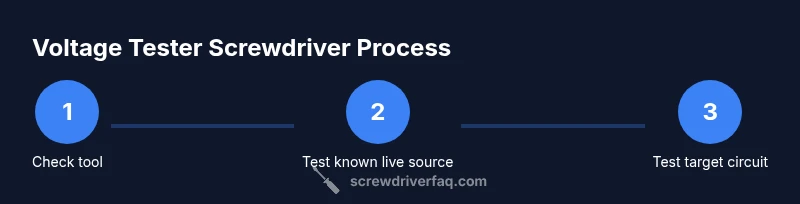
Here is a concise overview to pair with the formal Step-by-Step section below. Prepare your workspace with dry, clean surfaces and safety gear. Inspect the tool for damage and confirm it’s within its voltage range. Always test the tool on a known live source before approaching your target circuit. When testing, touch only the insulated handle and avoid metal jewelry. If the indicator lights up, de-energize the circuit before proceeding with work and re-test to confirm de-energization. After completing the work, re-test to ensure the circuit remains safe and store the tool in a dry, secure place.
Common mistakes and troubleshooting tips
Common mistakes include testing on a damp surface, using a damaged or cracked insulation, and assuming the indicator is correct without a known-good reference. Always verify with a known live source and avoid relying on a single reading. If the indicator fails to light on a known live source, replace the tool or have it serviced; never use it as your sole confirmation of safety. Keep the work area well-lit and avoid rushing; electrical work benefits from deliberate, methodical checks. If you’re uncertain, step back and re-check your setup, use an alternate testing method, or consult a qualified electrician.
Reading results and what they mean
A positive indicator means voltage is present and you should stop work and de-energize the circuit before continuing. A lack of indication on a known live source signals a potential fault in the tester or a dead source, not necessarily a safe condition. Always cross-check with a second method (like a separate tester or oscilloscope) if available and appropriate. When reading thresholds, a clear, bright indicator on the tester typically corresponds to typical household voltages; dim indicators may point to a weak battery or faulty device. If you’re ever unsure, pause work and re-test after replacing batteries or using a different device. Screwdriver FAQ’s guidance emphasizes confirming safety through multiple checks and adhering to established electrical codes.
Maintenance and care to extend life
Store the voltage tester screwdriver in a dry, secure location away from children and pets. Inspect insulation for cracks or wear before each use; replace the tool if there are any signs of damage. Clean the tip and handle with a dry cloth to remove dust or moisture. If the unit uses batteries, replace them as needed and avoid mixed battery types. Periodically check the indicator’s accuracy by testing a clearly live source and a known dead source. Proper storage and routine verification help ensure your tool remains reliable for everyday DIY tasks.
Tools & Materials
- Insulated voltage tester screwdriver(Rated for at least 600V; CAT II/III as appropriate; ensure indicator clearly visible in your working environment)
- Insulating gloves(Electrical-rated; wear when handling exposed conductors)
- Safety goggles(Eye protection against sparks or debris)
- Dry work surface mat(Rubberized or insulating mat to reduce grounding risk)
- Non-contact voltage tester (optional)(Use as a quick confirmation before contact testing)
Steps
Estimated time: 5-15 minutes
- 1
Prepare workspace and PPE
Set up a dry, well-lit area. Put on insulated gloves and safety glasses. Clear clutter and remove metal jewelry that could contact energized parts. This step reduces the risk of accidental contact and improves control during testing.
Tip: Double-check that your gloves are rated for electrical work and fit snugly to maintain dexterity. - 2
Inspect the tester for damage
Examine the tip, handle, and insulation for cracks, dents, or wear. A damaged tool can give false readings or cause shocks. If you spot any damage, replace the tool before proceeding.
Tip: Do not use a tester with exposed metal or cracked insulation; safety comes first. - 3
Test the tool on a known live source
Before approaching the target circuit, test the tester against a source you know is live (like a working outlet). Observe the indicator; it should clearly light up or show the expected reading.
Tip: If you’re unsure, use a second method to confirm the live status. - 4
Approach the target circuit
With one gloved hand, hold the insulated handle and gently contact the terminal or conductor you plan to test. Avoid touching exposed metal with anything other than the insulated handle. Keep the other hand away from conductive paths.
Tip: Maintain steady hands and keep fingers off the blade and metal parts. - 5
Read the indicator and interpret
Observe the indicator’s behavior: a lit indicator means voltage is present; no light indicates absence or a fault in the tester. If you see inconsistent results, re-test the source with another method and confirm de-energization before any work.
Tip: Use a known dead source as a negative control to validate the tester’s response. - 6
De-energize and re-check before work
If voltage is detected, de-energize the circuit at the disconnect or breaker, then re-check with the tester to confirm de-energization before touching any components.
Tip: Lockout/tagout practices are recommended for ongoing tasks.
Quick Answers
What is a voltage tester screwdriver?
A voltage tester screwdriver combines a turning tool with a built-in voltage indicator. It helps you verify live circuits before you touch components, improving safety during basic electrical tasks.
A voltage tester screwdriver is a screwdriver with a built‑in voltage indicator that helps you check if a circuit is live before you touch anything.
Can you test a live outlet with a voltage tester screwdriver?
Yes, you can test a live outlet to confirm presence of voltage. Always de-energize if you need to work on wiring, and re-check after de-energizing.
You can test a live outlet to confirm voltage, but always de-energize before actual work and re-check after.
Is a voltage tester screwdriver safe for household testing?
When used correctly with proper PPE and following safety steps, it’s a safe first check for household tasks. It does not replace professional training or a licensed electrician for complex work.
When used correctly and with safety gear, it’s a safe first check for simple tasks, but it’s not a substitute for professional training.
What should I do if the tester indicates voltage after touching a conductor?
Stop work, de-energize the circuit, re-check with the tester, and consult a licensed electrician if the issue persists. Misreads can happen with damaged tools or incorrect technique.
If voltage shows up after touching, stop, de-energize, and re-check; if it continues, contact a professional.
What are common mistakes when using voltage tester screwdrivers?
Common mistakes include testing in damp areas, using damaged insulation, and relying on a single reading. Always verify with multiple checks and keep PPE on at all times.
Common mistakes include damp testing, damaged insulation, and trusting one reading; verify with more checks and wear PPE.
Do voltage tester screwdrivers work on all voltages?
Most home-use testers cover typical household voltages (up to around 600V). Check your model’s rating and never exceed it.
Most home testers cover up to around 600V; always check the rating and don’t exceed it.
Watch Video
The Essentials
- Choose an insulated voltage tester screwdriver with appropriate voltage ratings.
- Always wear PPE and keep the workspace dry and clear of metal jewelry.
- Test the tool on a known live source before approaching any circuit.
- De-energize the circuit and re-check with the tester before work.
- Maintain and inspect tooling regularly to ensure reliability.