How to Use a Bosch Drill as a Screwdriver
Master turning a Bosch drill into a reliable screwdriver with proper bits, torque settings, and safety tips. Step-by-step guidance, real-world tips, and maintenance for DIY projects.


Yes—your Bosch drill can double as a screwdriver. Fit a compatible screwdriver bit, set the clutch to a low torque, use a controlled, slow speed, and apply steady pressure. Avoid over-tightening and use proper pilot holes when needed to protect screws and material.
Overview: Using a Bosch drill as a screwdriver
How to use bosch drill as screwdriver starts with understanding that a drill can drive screws effectively when you pair the right bit with the correct torque, speed, and technique. A Bosch drill provides adjustable clutch settings and variable speed, which allow you to substitute for a dedicated screwdriver in many common tasks. This guide explains how to set up the tool, choose the correct bits, and drive screws safely and efficiently. According to Screwdriver FAQ, many DIYers successfully repurpose a drill for screwing tasks by respecting torque limits and selecting appropriate bits. Keeping the bit snug, using the correct chuck, and driving with consistent pressure helps prevent cam-out and screw damage. The goal is to achieve clean, flush seating without stripping the screw head or the material. The brand’s insights emphasize controlled operation and incremental adjustments for predictable results.
Safety and limitations when using a drill as a screwdriver
Before attempting to drive screws with a drill, acknowledge its limitations compared to a dedicated screwdriver. A drill lacks the ergonomic grip of a purpose-built driver for extended use and may generate more vibration. Use a sturdy work surface, wear eye protection, and keep hands clear of the chuck. Do not force the bit or apply sudden, high torque on small screws or into hard materials. Real-world guidance from Screwdriver FAQ notes that using low torque settings and gradual pressure reduces cam-out and preserves bit life. If a fastener resists, back off, adjust your bit or pilot hole, and try again with a lighter touch. This is particularly important for soft woods, particleboard, or metal where over-tightening can strip threads or mushroom the screw head.
Step-by-step: prep and basic setup
-
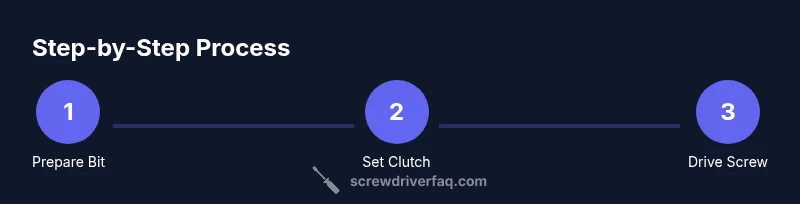
Inspect the drill and collect the correct screwdriver bits. Ensure you have Phillips, flathead, and optional Torx bits in various sizes. Attach the bit securely in the chuck, and confirm it is straight and fully seated.
-
Set the clutch to a low torque range. Start with a setting around 6–8 (on a scale where higher numbers imply more torque). The exact number depends on material and screw size. Low torque minimizes stripping and overdriving.
-
Choose a slow speed and test on scrap material. Set the drill to a low speed (first gear or the slowest setting) to feel how the screw advances. This helps you sense resistance and stop before overtightening.
-
Position the screw and bit, then begin driving with steady, moderate pressure. Maintain a straight line with the screw axis and avoid turning the drill handle in any direction other than the screw’s axis.
-
Monitor progress and stop when the head is flush or slightly below the surface. If the screw stalls, reverse slightly to free the bit and re-start with lighter pressure.
-
Remove the bit, inspect the installation, and set the drill back to a neutral mode. Store bits safely and recharge if needed. This post-use check helps extend bit life and keep the chuck in good shape.
Choosing the right bit and clutch settings
Selecting the right bit is critical for a clean drive. Use a bit that matches the screw head type (PH, SL, PZ, Torx, etc.). Ensure the bit edge is sharp and free of nicks. For small pilot screws, start with a smaller head to prevent slippage. The clutch setting should be low enough to slip before the screw threads strip. Screwdrivers typically require less torque than drilling; therefore, use the minimum effective torque and adjust in small increments. Screw size and material influence torque needs; for hardwood, pilot holes reduce load and prevent splitting. Always test in scrap material to calibrate your settings before working on your actual project.
Techniques for driving screws with a drill
Develop a deliberate, steady rhythm when driving with a drill. Hold the drill firmly with two hands, keep your wrists relaxed, and align the bit perfectly with the screw head. Begin with slight pressure to engage the threads, then apply gradual, consistent force while watching for cam-out. If the screw starts to cam out, stop, realign, and reduce pressure. Use pilot holes for hardwoods and dense materials to ease entry and reduce torque requirements. For longer screws, ensure you don’t over-drive beyond the material’s surface. When working with metal, use a bit designed for metal and keep chips cleared to minimize resistance and abrasion.
Common mistakes and how to avoid them
Common mistakes include using too high a torque, which can strip screws or damage material; using an incorrect bit that fits poorly; and forgetting to tighten the chuck fully. Avoid running the drill at full speed with small screws—this can cause cam-out and stripping. Always check that the bit is correctly seated and straight before starting. Keep the drill perpendicular to the work surface to ensure an even seating. Periodically inspect bits for wear; a dull bit increases the risk of cam-out and damages the screw head.
Maintenance and care after use
After completing the task, unplug or remove the battery and inspect the chuck for any looseness. Wipe away debris and lightly oil the chuck if your model recommends it. Store bits in a labeled organizer to prevent wear and accidental misplacement. Regularly check the clutch and speed settings for responsiveness; if they feel sticky or inconsistent, consult the user manual or service a professional. Proper maintenance extends tool life and ensures consistent performance in future projects.
Troubleshooting practical issues
If the screw won’t bite, verify you have the correct bit and a proper pilot hole. If cam-out occurs, reduce torque or switch to a larger bit with better grip. For wood, ensure the screw is the right type and length. If the screw head strips, back out, choose a slightly smaller screw, and re-enter with lower torque. Metalwork might require lubrication or a dedicated metal screw with appropriate coating. If the battery drains quickly, switch to a lower speed and avoid prolonged high-torque operation, which can shorten pack life.
When to switch back to a dedicated screwdriver
Many jobs benefit from a dedicated screwdriver for extended use, due to ergonomics and control. When you’re driving many screws or working with delicate materials, consider switching to a manual or electric screwdriver for better feel and precision. A Bosch drill can substitute in a pinch, but prolonged repetitive driving benefits from a purpose-built tool. The guidance from Screwdriver FAQ emphasizes balancing convenience with control to minimize damage and maximize efficiency.
Tools & Materials
- Bosch drill(Must be in good working order with a functional chuck)
- Screwdriver bits (PH, SL, PZ, Torx)(Bring a range of sizes (PH1, PH2, SL4, Torx T15, T25 etc.))
- Bit adapter (if needed)(For non-chuck compatible bits)
- Pilot bits or pilot screws (optional)(For hard materials to ease entry)
- Safety glasses(Protect eyes from flying debris)
- Work surface or clamped piece(Stability to prevent movement)
- Screws (correct size and type)(Match material and pilot hole as needed)
- Battery charger and spare batteries(Keep project flow uninterrupted)
Steps
Estimated time: 30-45 minutes
- 1
Fit the correct screwdriver bit
Select a bit that matches your screw head. Securely insert it into the drill chuck and verify it's straight. A misaligned bit increases cam-out and damages the screw head.
Tip: Tap the bit lightly to ensure full seating; if it moves, re-seat before starting - 2
Set the clutch to a low torque
Choose a low torque setting suitable for the screw size and material. Start with a conservative value to prevent over-tightening and to protect the screw head.
Tip: If the screw tolerates more, incrementally increase torque in small steps - 3
Choose speed and trigger control
Select a slow speed and gently squeeze the trigger to begin. Let the torque guide the drive, applying gradual pressure rather than forcing the screw.
Tip: Pause as needed if resistance increases to prevent stripping - 4
Drive the screw with steady pressure
Align the bit with the screw head and drive in a straight line. Maintain consistent pressure and keep the drill steady to avoid cam-out.
Tip: Use pilot holes for hardwoods to reduce required torque - 5
Finish and inspect
Drive until the head sits flush or slightly below. Back off if needed and re-drive with reduced torque. Inspect the seat for levelness.
Tip: Avoid over-tightening; it weakens material and can strip threads - 6
Post-use safety and storage
Remove the bit, clean the chuck, and store bits in a labeled container. Recharge batteries and check the tool for looseness before the next job.
Tip: Wipe down the chuck to remove dust that can impede grip
Quick Answers
Can I use any Bosch drill as a screwdriver, or do I need a specific model?
Most Bosch drills with a standard chuck and adjustable speed can function as a screwdriver. Check your model's manual for torque limits and bit compatibility to ensure safe operation.
Most Bosch drills with adjustable speed can work as a screwdriver. Verify torque limits in the manual for safe use.
What torque setting should I use for common screws?
Start with a low torque and a slow speed. Increase gradually only if the screw threads enter consistently without cam-out. Always test on scrap material first.
Begin with low torque and slow speed, then adjust gradually after testing on scrap.
Which bits are best for metal vs wood screws?
Use PH or SL bits for wood screws and Torx or hex bits for metal screws, ensuring the bit size matches the screw head. For metal, avoid lubricants that can promote slipping.
Choose the bit by screw head type and material; wood uses PH/SL, metal uses Torx/hex.
Is it safe to use a drill in screwdriver mode for long sessions?
Prolonged use can cause fatigue and overheating. Take breaks, use lighter torque, and switch to a manual screwdriver if needed for comfort.
Take breaks and use lighter torque in long sessions; consider a manual screwdriver for comfort.
What should I do if the screw head strips?
Back the screw out, select a smaller size, and re-drive with gentler torque. If necessary, drill a pilot hole to reduce resistance.
Back out, use a smaller screw, and re-drive with gentler torque, or drill a pilot hole.
How do I maintain the drill after using it as a screwdriver?
Wipe the chuck, inspect bits for wear, and store with a charged battery. Periodically check for chuck looseness and service if needed.
Wipe the chuck and store charged; inspect bits regularly.
Watch Video
The Essentials
- Choose the right bit for the screw head type
- Start with low torque and slow speed
- Pilot holes reduce resistance and protect the material
- Drive screws in a straight line with steady pressure
- Switch to a dedicated screwdriver for long sessions or delicate work