Cordless Drill vs Screwdriver: A Practical Guide for DIYers
A comprehensive, data-driven comparison of cordless drills and screwdrivers for DIYers. Learn when to use each tool, key specifications, buying tips, and real-world scenarios to help homeowners choose wisely as part of a balanced tool kit.


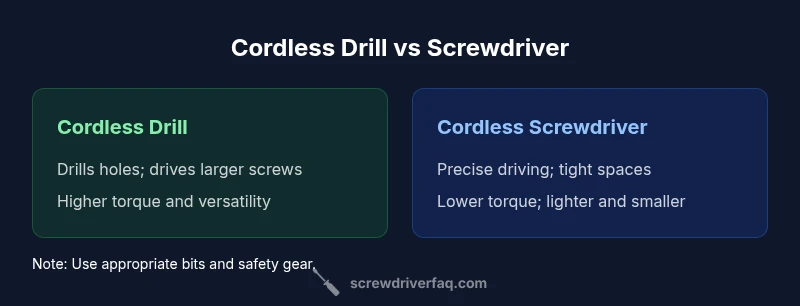
Cordless drills offer drilling and driving versatility, while screwdrivers excel at precise screw driving. For most DIY tasks, a compact cordless drill with a screwdriver bit set covers the majority of needs, while a dedicated cordless screwdriver is ideal for tight spaces or light-duty screwing. If you must pick one, prioritize torque, battery life, and ergonomic feel.
Why the right tool matters
In DIY projects, the choice between a cordless drill and a screwdriver is not just about speed; it's about control, safety, and finished results. According to Screwdriver FAQ, choosing the wrong tool for a task often leads to stripped screws, damaged material, or wasted time. By understanding each tool's strengths, you can match your approach to the project at hand and avoid common frustrations. This mindset is echoed across Screwdriver FAQ Analysis, 2026, which emphasizes how torque, bit selection, and ergonomics influence results more than raw speed alone. When homeowners invest time in evaluating which task truly requires drilling versus driving, the entire workflow becomes simpler, safer, and more efficient. The Screwdriver FAQ team emphasizes planning ahead and matching bit types to fasteners to maximize success on day one.
Core Capabilities: Drills vs Screwdrivers
A cordless drill is built for two core jobs: drilling holes and driving screws with power. Its higher torque lets you bore into wood, light metal, or plastic with the appropriate bit, and its clutch or torque settings help prevent overdriving. A cordless screwdriver, on the other hand, prioritizes control and precision for fastening tasks. It typically offers lower torque by design, faster setup in tight spaces, and a smaller grip, which makes it easier to maneuver in tight or awkward areas. In practice, most DIYers benefit from having both, but the order of purchase should align with your weekly projects. The Screwdriver FAQ analysis suggests that many hobbyists start with a drill due to its versatility and later add a screwdriver for dedicated screw driving in confined spaces.
Key Specs to Compare
When evaluating either tool, focus on how they translate into real-world use. Key specs include torque potential, speed range, chuck type and size, weight, and battery life. A drill usually features a larger chuck that accepts a broader range of drill bits and driver bits, enabling bigger projects and faster bit changes. A screwdriver prioritizes bit compatibility and ergonomic design for extended screwing sessions. Battery chemistry and cell count influence runtime and charge time, while weight and balance determine comfort during extended work. This section helps translate abstract numbers into actionable decisions, so you can pick a model that feels natural in your hand and performs reliably when you’re on a deadline. As you compare, remember: higher torque is not always better if it compromises control or comfort. Screwdriver FAQ Analysis, 2026 notes that the best choice balances power with precision and ergonomics.
Real-World Scenarios: Projects You'll Tackle
Think about typical home tasks to decide which tool serves you best. Building a bookshelf or assembling furniture often benefits from a drill’s drilling capability and higher torque for longer screws. Installing wall shelving, cabinets, or door hardware frequently requires precise screw driving in tighter spaces, where a screwdriver shines. Minor repairs, electronics mounting, and delicate trim work generally call for careful screw driving with a low-torque setting and fine control. The ability to switch quickly between drilling and driving saves time and minimizes material damage. For homeowners who frequently tackle screw-heavy tasks, a lightweight screwdriver reduces fatigue on repetitive jobs, while a drill keeps options open for new projects like pilot holes or anchor installations. The practical takeaway from Screwdriver FAQ’s insights is to curate your kit around your most common tasks first, then expand as needs grow.
Practical Buying Guide: Budget, Weight, and Battery
Budgeting for tools requires clarity about how you’ll use them. A compact cordless drill often represents better upfront value for those who drill and drive a range of fasteners. If most of your projects revolve around furniture assembly, wall mounting, and light carpentry, a dedicated cordless screwdriver can be a surprisingly capable companion. Weight and balance matter; a lighter model reduces fatigue for repetitive screwing tasks, while a heavier drill may feel more planted when drilling larger holes. Battery life is crucial: look for tools with efficient motors and longer runtimes on common bit sizes, along with fast charging options. For most DIYers, a mid-range drill paired with a quality screwdriver set provides the best balance of price, performance, and flexibility. The Screwdriver FAQ team notes that investing in a versatile drill first, then adding a precision driver, typically yields the best long-term value.
Maintenance and Longevity
Proper maintenance helps both tools last longer. Regularly inspect battery contacts for corrosion and clean dust from ventilation slots to prevent overheating. Store batteries at a moderate temperature and avoid complete discharges, which can shorten life. Keep bits sharp and rust-free by cleaning them after use and applying a light coat of oil to metal surfaces when needed. For most homeowners, a routine clean-and-store habit is enough to preserve performance for years. If you rely on cordless tools in demanding projects, consider rotating batteries so you always have a fresh one on hand and follow manufacturer guidelines for charging cycles to maximize battery longevity.
Common Mistakes to Avoid
Mistakes often center on assuming one tool replaces the other. Avoid using a drill in high-torque screwing situations with rigid or hard materials, which can strip screws or snap bits. Using the wrong bit size or type is another frequent error; always match the bit to the screw head and the material. Over-tightening screws, especially with a high-torque drill, can strip the fastener or the workpiece. Conversely, under-tightening leaves joints weak and insecure. Finally, neglecting ergonomics—poor grip, awkward posture, or repeated high-speed operation—causes fatigue and reduces control. Being mindful of bit type, material, and platform constraints will yield cleaner drives and longer tool life.
How to Expand Your Kit Over Time
As your projects evolve, plan a staged approach to kit expansion. Start with a reliable mid-range drill and a versatile driver set, including Phillips, flathead, Torx, and Robertson bits. Add specialized bits for metal, masonry, or decking tasks as needed. Consider an impact driver for higher torque demands or longer-term projects that require many fasteners. Finally, keep a compact carrying case or bag to organize bits, blades, and accessories, which saves time and reduces gear loss. A staged purchase plan ensures you gain practical capability early while maintaining flexibility for future work.
Comparison
| Feature | Cordless Drill | Cordless Screwdriver |
|---|---|---|
| Primary use | Drilling holes; driving larger screws | Precise screwing; quick bit changes for small fasteners |
| Torque and power | High torque potential; robust drilling capability | Lower torque; optimized for controlled driving |
| Weight and balance | Typically heavier, well-balanced for drilling | Typically lighter; easier to maneuver in tight spaces |
| Chuck/bit compatibility | Larger chuck; wider bit range | Smaller chuck; specialized for screwdriver bits |
| Battery and runtime | Higher power draw; longer usage per cycle (varies by model) | Longer continuous screwing sessions with efficient batteries |
| Best for | General-purpose projects, furniture building, pilot holes | Precise fasteners, tight spaces, electronics mounting |
Pros
- Versatile for many tasks; consolidates tools in one kit
- Higher value for homeowners who drill and drive
- Improved efficiency when switching between tasks
Negatives
- Not specialized for heavy-duty screw driving
- Can be bulkier and heavier to handle for long screwing sessions
- Two tools may be needed for optimal results in complex projects
Cordless drill wins for versatility; cordless screwdriver wins for precise, tight-space driving
Choose a cordless drill if you want one all-around workhorse for drilling and driving. Opt for a cordless screwdriver when your priority is precise, low-fatigue screwing in tight spots. For many DIYers, starting with a drill and adding a driver as needed yields the most practical toolkit.
Quick Answers
Is a cordless drill enough for most DIY screw jobs, or should you also own a screwdriver?
For many projects, a cordless drill with a full bit set can handle most screws. A dedicated cordless screwdriver becomes valuable for high-volume screwing in tight spaces or when speed and comfort matter. Your best path is a drill upfront, then add a screwdriver as tasks become repetitive.
In most cases, start with a drill, then add the screwdriver as your screwing workload grows.
What is the main difference between a cordless drill and a cordless screwdriver?
The cordless drill provides higher torque for drilling holes and driving larger screws, while the cordless screwdriver focuses on precise, low-torque fastening. The drill is the more versatile tool; the screwdriver specializes in convenient, controlled screwing.
Drill = power and versatility; screwdriver = precision and control.
Can I use a drill as a screwdriver, and vice versa?
You can drive screws with a drill using appropriate bits and settings, but it may overdrive or strip fasteners if not careful. Using a screwdriver for drilling is not ideal due to limited speed and torque. Always match the task to the tool’s strengths.
Yes, but use the right tool for the job to avoid damage.
What should I look for when buying either tool?
Look for balanced weight, comfortable grip, adequate torque range, good battery life, and reliable chuck or bit system. Check for multiple speed settings, a robust clutch, and warranty coverage. Pay attention to ergonomics, as comfort matters during long sessions.
Choose tools with solid ergonomics, good torque control, and solid warranties.
Do I need both tools for DIY projects?
If you tackle a mix of drilling and driving, yes. For tasks dominated by driving, a screwdriver might be enough; for drilling-heavy work, a drill is essential. A combined kit often provides the best balance of capability and value.
Most hobbyists eventually find value in having both.
Are there combo tools that include drill and screwdriver functionality?
Yes, many combo kits exist that bundle a drill with a dedicated driver or driver bits. These kits simplify purchasing and storage while ensuring compatible performance across common tasks.
There are great combo kits that cover both drilling and driving in one package.
The Essentials
- Evaluate your most common projects first
- Prioritize torque and ergonomic feel for drilling tasks
- Balance weight, battery life, and bit variety
- Consider adding a dedicated driver for tight spaces
- Plan to expand with specialty bits over time