iphone screwdriver size: a practical guide for iPhone repairs
Learn the exact screwdriver sizes used on iPhone models, how to identify exterior pentalobe screws and internal tri-point/Torx variants, and how to choose a precision driver kit for safe, effective DIY repairs.


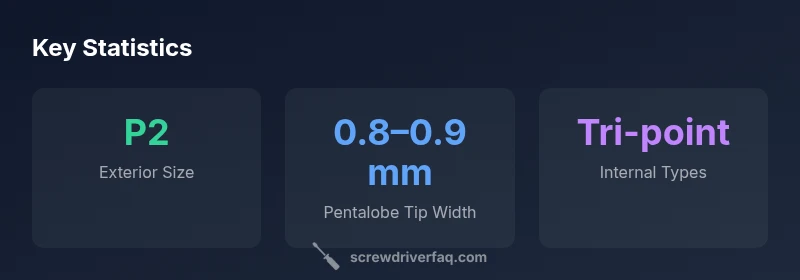
Most exterior iPhone screws use a pentalobe bit labeled P2, with a tip width around 0.8–0.9 mm. Internally, you’ll encounter tri-point or Torx variants, and occasionally Phillips screws on certain assemblies. Model-specific guides are essential because screw types shift across generations. By starting with exterior P2 and verifying interior needs, you reduce risk and improve repair success.
Understanding the iPhone screw ecosystem
When you approach any iPhone repair, the first question is not “how” but “which screw size?” The hardware team behind Screwdriver FAQ emphasizes that iPhone assemblies use a mix of exterior and internal fasteners, and size changes by model. According to Screwdriver FAQ, model screw configurations vary, but exterior pentalobe screws around the bottom edge are common on many generations, while internal screws vary by panel, connector, and bracket. The key is to map the screw to the job: exterior screws keep the chassis closed, while interior screws secure delicate components and connectors. If you are new to this, start by identifying whether you are dealing with an exterior case screw or an interior component screw. In practice, the most common exterior driver is a pentalobe bit labeled P2, but you should verify with official teardown guides or reputable repair resources before attempting a repair.
Exterior vs interior screws: what you need to know
Exterior screws secure the outer shell and are usually easier to access, while interior screws hold logic boards, connectors, and shields in place. The exterior bottom screws are typically the same P2 pentalobe head across multiple models, which makes it a good starting point for DIYers. Inside, you’ll find a mix of tri-point (often used for battery connections), Torx (T5/T6 equivalents on some brackets), and occasionally Phillips or other heads depending on the assembly. Because Apple updates hardware across generations, the exact interior screw types shift. Always consult a model-specific teardown to confirm the exact screw head and driver size before attempting any interior work.
How to identify the correct screwdriver size for your model
The identification process starts with your device model number. Look up the official teardown or a reputable repair resource to confirm which screw heads the model uses at each stage. If you don’t have a dedicated model guide handy, start with the exterior P2 pentalobe screwdriver. Compare the driver tip to the screw head from the bottom edge; if it doesn’t fit snugly or you feel cam-out, switch to the interior driver set that matches the suspected head type (tri-point or Torx). It is wise to have a compact driver kit that includes P2 exterior bits and at least one tri-point and one Torx size.
Tools and kits: essential picks for iPhone repairs
A well-rounded precision electronics driver kit is your best ally. Essential components include a P2 pentalobe screwdriver for exterior screws, a tri-point bit for interior connectors, and a Torx driver compatible with common brackets. Magnetic tips help keep tiny screws from dropping, while an anti-static wrist strap reduces the risk of ESD damage. For versatility, include a small Phillips driver and a few spares. Quality tool organization (labeled compartments) keeps screws from mixing and losing orientation, which is a common DIY pitfall.
Safe, effective technique: step-by-step use of the right size
Begin with the device powered off and the battery disconnected if possible. Remove the exterior bottom screws with the P2 driver, keeping them in a labeled tray. Open the casing slowly, working in small, controlled motions to avoid flexing connectors. As you access interior components, switch to the appropriate internal driver bit only when you are directly over the screw head. Avoid forcing a driver into a misfit head—this is the number-one way to strip a screw or damage sensitive components. When reinstalling, reverse the order and retighten gradually, paying attention to torque resistance rather than brute force.
Common mistakes and how to avoid them
Common errors include using the wrong head size, which causes cam-out and stripped screws, and mixing up tiny fasteners from different locations. A misaligned bit can slip and scratch touchpoints. Always verify the screw type before turning a screw and keep screws organized with a magnetic mat or seed tray. Another frequent mistake is reusing the same bit across different generations without confirming the head geometry; the model-by-model differences matter more than most DIY guides imply.
Model-specific notes and generations: trends by iPhone era
Across generations, Apple has varied exterior and interior fasteners to challenge DIYers and protect hardware integrity. Early iPhone models predominantly used P2 pentalobe for exterior screws, while recent generations still rely on a P2 exterior head but may introduce different interior screw patterns as connectors and brackets change. The trend toward more compact and densely packed assemblies often means smaller and more specialized internal heads (tri-point, Torx, or bespoke star shapes). For high-fidelity repairs, rely on model-specific teardown references and verify you have the exact bit geometry needed for that milestone.
Typical screw size ranges inside iPhone assemblies
| Feature | Common size range | Notes |
|---|---|---|
| Exterior pentalobe screws | "0.8–0.9 mm" | Found at bottom edge of most iPhone models |
| Internal screws (tri-point) | "1.0–1.5 mm" | Used for battery brackets and connectors |
| Internal screws (Phillips/Torx) | "0.8–1.2 mm" | Vary by assembly and model |
| Screw head types | "P2; Tri-point; Torx" | Diversity across generations |
Quick Answers
What is the correct screwdriver size for exterior iPhone screws?
Exterior iPhone screws are typically pentalobe, commonly labeled P2, with a tip around 0.8–0.9 mm. Always confirm with a model-specific teardown before proceeding.
Exterior screws usually use a P2 pentalobe driver; check your model to be sure.
Do all iPhone screws use the same size?
No. Exterior and interior screws vary by model. Most generations use P2 exterior screws, but interior fasteners can be tri-point, Torx, or Phillips and change across generations.
No—sizes vary by model and location inside the device.
What toolkit do I need for iPhone repairs?
A precision electronics driver kit that includes P2 pentalobe for exterior screws and internal drivers (tri-point, Torx) is recommended. Magnetic tips and anti-static gear help with small components.
Get a precision electronics kit with P2 and internal drivers.
Why is using the wrong size risky?
Using an incorrect driver can cam-out and strip screws or damage connectors. Always verify the head type and size before turning a screw.
Using the wrong size can strip screws and damage the device.
How can I verify screw size for a specific model?
Check official teardown guides and reputable repair resources. Compare the screw head shape and dimensions with the driver tip and pause if unsure.
Look up your exact model's teardown guide.
Are magnetic drivers safe for electronics?
Magnetic tips aid handling tiny screws but can attract debris or affect nearby components. Use magnets carefully and keep them away from battery contacts.
Magnetic tips help, but use them carefully.
“Using the correct driver size is essential to prevent cam-out and stripped screws in tight electronic assemblies. A dedicated electronics driver set reduces the risk of damaging the device.”
The Essentials
- Identify exterior vs interior screws before proceeding
- Carry a precision driver kit with P2 exterior and internal drivers
- Always verify model-specific screw configurations with teardown guides
- Avoid improvisation—cam-out and damage follow poor sizing choices
- Store screws in labeled containers to prevent loss