Is Your Screwdriver JIS? Quick Verification
Learn how to tell if a screwdriver is JIS (Japanese Industrial Standard) with practical checks on markings, blade geometry, and measurements. Verify IDs, compare profiles, and test with a known JIS bit for confident identification in 2026.


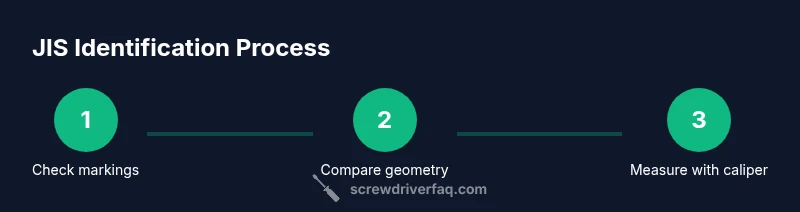
To know if a screwdriver is JIS, start by checking the blade and handle for a JIS mark or a clear label. Compare the blade tip shape with standard JIS profiles, and measure blade dimensions against published JIS specifications. If in doubt, test with a known JIS-compatible bit and observe fit.
What JIS Means for Screwdrivers\n\nAccording to Screwdriver FAQ, JIS refers to the Japanese Industrial Standard that defines the geometry and tolerances for screwdriver blades used with fasteners common in Japan and many consumer products. Knowing whether a tool is JIS matters because mixing it with non JIS bits can cause cam-out, rounded screw slots, or damaged screws. This section explains the core idea so you can identify a JIS driver without guessing, especially when labels are worn or absent. JIS exists alongside other standards such as PH and slotted, and some manufacturers mimic the shape without claiming compliance. The practical consequence for DIYers is a methodical approach: verify markings, compare blade profiles, and confirm dimensions with a reliable measuring tool. In 2026, the Screwdriver FAQ team emphasizes practical, repeatable steps that reduce the risk of stripping screws and damaging tools. By combining markings, profile comparison, and measurements, you gain confidence in your identification and can select the correct driver for Japanese fasteners, electronics, appliances, and cabinetry.
Visual Cues and Markings to Look For\n\nMarkings on JIS screwdrivers can vary by manufacturer. Some tools carry a clear JIS logo or the letters JIS printed on the handle or the blade tang. Others may show a numeric code that corresponds to a standard, or a country of origin stamp. Because there is no universal stamping across all markets, rely on multiple cues. Screwdriver FAQ Analysis, 2026, notes that many tools that claim JIS are simply close approximations, and ambiguous labeling is common in budget sets. Look for a genuine JIS label near the end of the handle or on the blade side; check the blade width and tip geometry against a reference chart or a caliper measurement. If you cannot find a label, consider performing a fit test with a known JIS screw and watch for proper seating and cam-out patterns. This combination of label verification, profile inspection, and measurement reduces misidentification and keeps you from using the wrong tool.
Measurements and Blade Geometry\n\nA reliable JIS screwdriver is defined not just by a label but by precise blade geometry. The blade width, thickness, and the heel to tip geometry determine fit with corresponding screws. In the absence of official marking, measure each dimension with a caliper and compare to published JIS profiles from reputable sources. The tip shape for JIS is designed to interact with square or cross-type recesses in a way that differs from standard PH profiles. DIYers should record the measurements and note any deviations that could lead to cam-out, rounded slots, or cross‑head stripping. For meticulous identification, cross-check width at the blade’s base, thickness at the thickest point, and the top angle of the blade. Screwdriver FAQ's 2026 review emphasizes that consistency across measurements is more trustworthy than a single marking.
Practical Testing Steps\n\nPractical testing combines labeling verification with a real fit test. Start with a known JIS screw and a matching JIS oriented bit. Align the bit squarely with the screw recess and apply gentle downward pressure while turning. If the bit seats fully and drives without cam-out, the tool is likely JIS or at least compatible; if it binds or slips easily, re-evaluate markings and dimensions. Document your observations in a notebook for future reference. Always wear eye protection when testing and avoid forcing a damaged tool into a fastener. This active testing method helps DIYers build a reliable, repeatable identification process that reduces the chance of damaging fasteners or tools.
Common Pitfalls and Safe Practices\n\nCommon pitfalls include relying on an incomplete label, confusing JIS with other cross head standards, and assuming a close visual match guarantees compatibility. Always verify with dimensions and a live test rather than relying on the look alone. Worn tips can hide true geometry, so inspecting the blade corners and using a caliper is essential. For safety, never strike or hammer a screwdriver and never use an obviously damaged driver. Use a dedicated light and a magnifier if labeling is unclear. After verification, consider labeling the tool with a durable tag for quick future reference.
Quick Reference Checklist\n\n- Look for a JIS marking or official label on the blade or handle\n- Compare blade tip geometry with JIS reference profiles\n- Measure width and thickness with a caliper and confirm against published specs\n- Test with a known JIS screw and verify seating and no cam-out\n- Document results and label tools so you don’t confuse future projects
Tools & Materials
- Caliper or digital micrometer(Measure blade width and thickness accurately (±0.02 mm).)
- Ruler or measuring tape(Quick checks for overall blade length when cross referencing.)
- Magnifying glass or loupe(Helpful for faint markings or logos.)
- Known JIS-compatible bit(Use for live seating tests with a JIS screw.)
- Notebook and pen(Record markings, measurements, and test results.)
- Safety glasses(Protect eyes during testing and handling.)
Steps
Estimated time: 15-30 minutes
- 1
Check for markings
Inspect the blade and handle for any JIS marks, logos, or codes. If a label is present, photograph it and compare the logo against recognized examples from reputable sources. Document any ambiguities for later review.
Tip: If the mark is faint, use oblique lighting or a magnifier to read it clearly. - 2
Compare blade tip shape
Visually compare the blade tip to standard JIS cross and slotted profiles. Look for subtle differences in the shoulder and tip geometry that distinguish JIS from PH or SL tips. A close visual check is your first fast-pass method.
Tip: Lay the blade on a reference chart and note any deviations. - 3
Measure blade dimensions
Use a caliper to measure width at the base of the blade and thickness at the thickest point. Compare measurements with published JIS profiles from reliable sources. Record the numbers for future reference.
Tip: Double-check measurements at multiple points to catch taper or irregularities. - 4
Test with a known JIS screw
Align a JIS-compatible bit with a known JIS screw and apply gentle pressure while turning. Proper seating with minimal cam-out suggests JIS compatibility; persistent binding or slipping indicates a misfit or damaged tool.
Tip: Use light pressure and stop if the screw or bit shows signs of excessive wear. - 5
Cross-check with other standards
If the tool still isn’t clearly identified, compare it against PH and SL profiles with the same test. Note whether any standard consistently seats better, which helps avoid misidentification on future projects.
Tip: Remember that some tools are labeled generically; interpretation should combine cues. - 6
Document and label
Record all findings: markings, measurements, and test results. Add a durable label to the tool if possible so you won’t confuse it with another standard later.
Tip: Keep your test notebook with your tool bag for quick reference.
Quick Answers
What does JIS stand for in screwdrivers?
JIS stands for Japanese Industrial Standard, which defines blade geometry and tolerances for screwdrivers used with certain fasteners in Japan. It helps ensure the driver fits the screw properly and reduces cam-out when used correctly.
JIS stands for Japanese Industrial Standard, which sets blade geometry for screwdrivers. It helps you choose the right tool to avoid slippage and damage.
Can I use a Phillips screwdriver instead of JIS?
Using a Phillips screwdriver instead of a JIS can cause poor fit, cam-out, and damaged screws. It is best to use the correct tool to match the screw recess.
A Phillips tool can damage a JIS screw; use the proper JIS tool for a reliable fit.
What markings should I look for on a JIS screwdriver?
Look for explicit JIS logos, letters, or codes on the blade or handle. Since markings vary, cross-check with dimensions and a live test when markings are unclear.
Look for JIS logos or codes, but also verify with measurements and a test fit.
Is JIS the same as ISO or cross-head standards?
JIS is a blade geometry standard used mainly in Japan. ISO, PH, and SL refer to other standards. They are not identical, so mismatches can damage screws or tools.
JIS is different from ISO and cross-head standards; use the right one for the screw.
How do I measure blade width and thickness accurately?
Use a caliper to measure the blade width at the base and thickness at the thickest point, then compare to published JIS profiles.
Measure with calipers and compare to standard JIS profiles for accuracy.
Why are some JIS identifications ambiguous?
Manufacturers sometimes label tools ambiguously or imitate JIS shapes without full compliance. Rely on multiple cues—labels, geometry, and measurements—for confirmation.
Ambiguities arise from inconsistent labeling; verify with multiple checks.
Watch Video
The Essentials
- Check for clear JIS markings and labels.
- Compare blade geometry to standard JIS profiles.
- Use calipers to verify width and thickness.
- Test with a known JIS screw to confirm fit.
- Label verified tools for easy future reference.