Build Your Own Sonic Screwdriver: A DIY Guide
Learn how to build a prop-grade sonic screwdriver with safe electronics, a compact 3D-printed housing, and a step-by-step plan. Perfect for cosplay, display, and beginner makers.


Build your own sonic screwdriver by combining a microcontroller, a sound module, LEDs, a battery, and a modular housing. Follow the wiring and safety steps in our full guide for a reliable, display-ready prop.
What is a sonic screwdriver and why build it yourself
A sonic screwdriver is a fictional tool popularized in sci-fi media that uses light, sound, and interactive effects to enhance a character's toolkit. For hobbyists and cosplayers, building a convincing prop can be both educational and fun. According to Screwdriver FAQ, a hands-on DIY project like this reinforces basic electronics concepts, from power management to microcontroller programming. The Screwdriver FAQ team found that readers gain confidence by turning abstract ideas into tangible components. This guide aims to balance realism with safety, so you can enjoy a reusable prop without risking your safety or others. The project described here focuses on a compact, battery-powered wand with a distinct grip, a small speaker, a few LEDs, and a housing that can be printed or repurposed from an existing flashlight. By the end, you’ll have a reliable, display-ready sonic screwdriver capable of producing a recognizable wheeze, beep, or chirp when activated.
Why this matters for DIYers: learning to combine microcontrollers, sound modules, and LEDs translates into broader electronics skills and practical problem solving. You’ll also gain confidence in sourcing parts, testing circuits, and finishing a prop with a professional feel. The narrative here balances practicality with creative flair—enough realism to be impressive, enough flexibility to customize your design.
Design goals and safety considerations
Before you start assembling parts, set clear goals for your sonic screwdriver. Decide whether you want a display-only prop, a functional-but-safe electronic wand, or a fully interactive gadget with multiple sound presets. Safety first: keep any live circuitry away from flammable materials, use a properly rated battery pack with a protection circuit, and solder with good ventilation. If you plan to wear or transport the prop, ensure the housing is light and balanced to prevent fatigue. Snap-fit or magnetized housings can improve assembly while reducing risk of pinching wires. According to best-practice guides from Screwdriver FAQ, documenting your design decisions helps you iterate and share lessons with the DIY community. Finally, choose a shell that accepts future upgrades—portability and modularity pay off for cosplayers who want to reuse parts across projects.
Core components and how they work
A sonic screwdriver relies on a few core components: a small microcontroller (for logic and timing), a sound module (for sci-fi tones and beeps), LEDs (for optical effects), a compact power source, and a shell that houses everything. The microcontroller runs a simple program that triggers the sound module and LEDs when you press a switch. The sound module stores tone files or generated waveforms, while a speaker converts electrical signals into audible sound. LEDs provide visual feedback, blinking in response to actions or varying with presets. The housing not only protects the electronics but also contributes to the prop’s balance and ergonomics. Understanding how these parts interact helps you troubleshoot issues and experiment with new effects, like gated beeps or strobe lighting, without compromising core functionality.
Sourcing parts and tools
Part sourcing matters as much as the build itself. Start with compact, hobby-friendly components: a small microcontroller board, a slim sound module with a speaker, a few white LEDs, and a safe battery pack. Look for 3D-printed shells or repurpose a durable flashlight housing to save time. For wiring, silicone-insulated leads are easier to work with than stranded wire for small builds. If you’re new to soldering, practice on scrap copper before touching your final project. Remember to verify voltage compatibility across components to avoid damage and ensure safe operation. Screwdriver FAQ recommends documenting sources and keeping a running bill of materials to manage costs and replacements over time.
Build plan overview: electronics, housing, and finishing
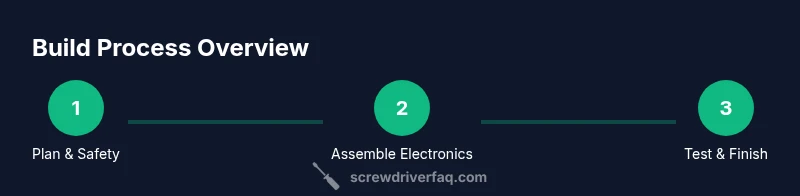
A disciplined build plan helps you stay organized. Start with an electronics skeleton: mount the microcontroller, hook up the sound module, connect LEDs, and route the battery leads. Then secure the components inside the housing, using heat shrink and zip ties to tidy cables. Finish by testing the button logic, calibrating LED brightness, and embedding the speaker so it projects clearly from the shell. Finishing touches—like a matte paint job or faux wear—increase realism without affecting functionality. The goal is a dependable prop that looks and sounds convincing while remaining safe to handle in cosplay setups.
Troubleshooting and common pitfalls
Common issues include weak or distorted sound, LEDs that fail to light, and power drains from improper wiring. Double-check switch orientation and ensure the battery polarity is correct before power-up. If the sound is quiet, verify speaker impedance and test with a known-good module. Loose wires can cause intermittent behavior; secure all connections with heat shrink and strain relief. Lastly, ensure the shell is not causing short circuits by keeping metal parts away from exposed conductors. A methodical approach reduces rework and helps you learn faster with each iteration.
Tools & Materials
- Microcontroller module (compact)(3-5V logic, small footprint)
- Sound module / buzzer(Preloaded sci-fi tones, adjustable volume)
- LEDs (3-6 white LEDs)(High-brightness, low current)
- Battery pack (Li-ion or AA)(Consider protection circuitry)
- Power switch(Location near grip for easy access)
- 3D-printed housing or repurposed shell(Internal cavity for components)
- Wiring and connectors(Silicone-insulated, 22-26 AWG preferred)
- Soldering iron and lead-free solder(Ventilated workspace; safety glasses)
- Heat shrink tubing(Cable protection and aesthetics)
- Multimeter(Voltage and continuity checks)
- Electrical tape or hot glue(Insulation and securing wires)
- Safety glasses(Eye protection during soldering)
Steps
Estimated time: 2-4 hours
- 1
Plan the layout and safety checks
Sketch a layout that accommodates all components with space for wiring. Decide on a switch location and ensure the housing has ventilation for the speaker. Create a simple wiring diagram to guide assembly and reduce rework later.
Tip: Draft a quick schematic on paper or a whiteboard before touching parts. - 2
Gather and verify parts
Collect all components and verify voltage compatibility. Check for compatible sizes so the assembly fits inside the chosen shell. Keep a parts list handy and check off items as you prepare.
Tip: Lay out parts on a mat to visualize wiring lengths and fit. - 3
Prepare workspace and safety setup
Set up a well-ventilated area for soldering. Put on safety glasses, organize tools, and prepare a non-conductive surface to work on. Pre-cut heat shrink and test-fit the housing without wiring.
Tip: Practice safe soldering technique on scrap pieces first. - 4
Assemble electronics skeleton
Mount the microcontroller and sound module on a small breadboard or mounting board. Route wires to the switch and speaker, but avoid crossing hot surfaces. Secure modules with non-conductive fasteners.
Tip: Keep a neat wiring path to simplify insulation later. - 5
Wire power and control circuits
Connect battery leads to the switch, then to the microcontroller's power input. Wire the sound module output to the speaker and link LED control pins to the microcontroller. Double-check polarity and continuity.
Tip: Use shrink tubing at all solder joints for safety. - 6
Install sound, LEDs, and protective housing
Place the speaker and LEDs inside the shell where they won’t press against wires. Use heat shrink to seal joints and hot glue or tape to secure components. Ensure the button is accessible and comfortable to press.
Tip: Test-fit multiple times before final securing. - 7
Program the microcontroller
Load a simple program that triggers the sound module and LEDs when the switch is pressed. Test different tones and LED patterns to achieve a convincing effect. Keep your code modular to allow future tweaks.
Tip: Comment code clearly for future revisions. - 8
Test and calibrate
Power the device and perform multiple activation tests. Listen for audio clarity and observe LED brightness consistency. Adjust delays and volume as needed, avoiding distortion.
Tip: Run a long test to catch intermittent faults. - 9
Finish and safety check
Seal the housing, perform a final battery safety check, and ensure no exposed conductors. Add a protective outer finish like paint or faux weathering to enhance realism without compromising insulation.
Tip: Keep spare parts and documentation for maintenance.
Quick Answers
What is a sonic screwdriver and why would I build one?
A sonic screwdriver is a fictional tool popular in sci-fi media. Building one teaches basic electronics, from microcontrollers to sound modules, and provides a safe, display-ready prop for cosplay or display. The project blends creativity with practical skills.
A sonic screwdriver is a sci-fi prop; building one teaches electronics and yields a ready-to-display cosplay tool.
Can I power this with standard batteries I have at home?
Yes, you can use a compact battery pack suited to the microcontroller’s voltage range. Choose cells that balance weight, size, and safety. Always include a protection circuit when using Li-ion cells.
Yes, use a compact battery pack within the device's voltage range and include protection when using Li-ion cells.
Is soldering required, and how safe is the process?
Soldering is common for secure connections, but you can use pre-soldered modules if available. Work in a ventilated area with safety glasses, and practice on scrap pieces first to learn proper technique.
Soldering is typical but you can pre-solder modules; work carefully with eye protection and ventilation.
Which microcontroller is best for beginners?
A small, low-power microcontroller with simple I/O is ideal for beginners. Look for boards with straightforward pin layouts and ample community tutorials to follow.
Choose a small, beginner-friendly microcontroller with an easy setup and plenty of tutorials.
How loud should the sound be, and can I adjust it?
Sound level should be audible but not overpowering. Use a volume control or programmable envelope to tailor tone. Always test with your intended display setup.
Make the sound audible but not loud, with room for adjusting volume as needed.
Can I repurpose an existing flashlight housing for the shell?
Yes, a sturdy flashlight shell can be repurposed, saving time and improving grip. Ensure the interior cavity fits your components and that the housing provides adequate insulation.
Repurposing a flashlight shell is a smart, common approach if it fits your parts and insulation needs.
Watch Video
The Essentials
- Plan the design and safety steps before building.
- Choose components compatible with a compact housing.
- Test electronics in stages to catch issues early.
- Finish with safe insulation and a convincing cosmetic finish.